
Ghost vs WordPress: Which Platform Is Better for Your Website?
Introduction
Choosing the right website platform is an important first step. It affects your design, content, SEO, speed, and growth. Many users compare Ghost vs WordPress before starting a blog or business website. Both platforms help users publish content online. However, both platforms serve different website goals.
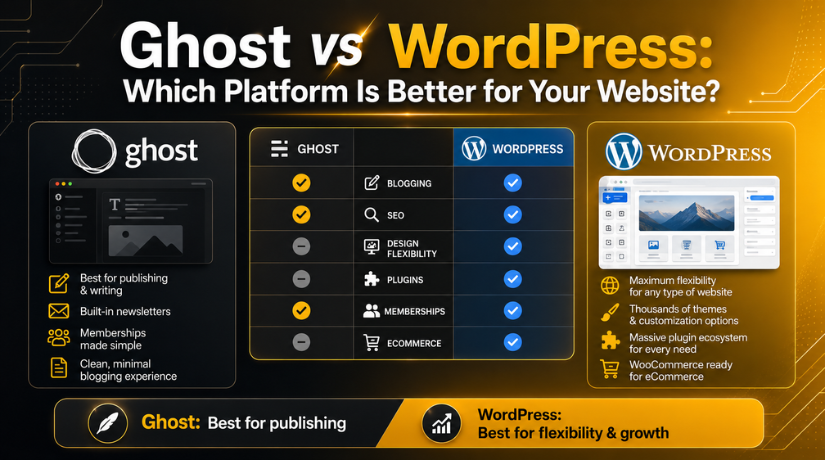
Ghost is mainly built for publishing, newsletters, and memberships. WordPress is built for many types of websites. You can use it for blogs, business sites, online stores, service pages, and more.
Many website owners ask, Which is better Ghost or WordPress? The answer depends on your needs. A writer may want a clean publishing tool. A business owner may need SEO tools, forms, pages, plugins, and custom design options.
This comparison helps you understand both platforms clearly. It also helps you choose the right option. The goal is not only to start a website. The real goal is to build a website that grows well
What Is Ghost? A Simple Overview for Website Owners
Ghost is a simple and modern publishing platform. It is mainly useful for bloggers, writers, publishers, and creators. It focuses on clean content writing and easy publishing. Ghost also supports newsletters and paid memberships.
When comparing Ghost CMS vs WordPress, Ghost feels more focused. It does fewer things, but it does them clearly. Users can write posts, send content to members, and manage subscriptions.
Ghost may work well if your main goal is content publishing. It is also useful for creators who want paid readers. However, it may feel limited for large business websites.
Ghost is suitable for:
- Personal blogs
- Online publications
- Newsletter websites
- Paid membership content
- Creator-focused websites
What Is WordPress? A Simple Overview for Website Owners
WordPress is a powerful and flexible content management system. It helps users create many types of websites. You can use WordPress for blogs, company websites, portfolios, stores, and learning sites.
WordPress gives more control over design and features. You can choose from many themes and plugins. These tools help you add forms, SEO features, security, speed tools, and online store options.
When comparing Ghost CMS vs WordPress, WordPress offers more flexibility. It can start as a simple blog. Later, it can grow into a complete business website.
WordPress may need more setup and care. Still, it gives better control for long-term growth. For many USA businesses, WordPress is often the stronger choice.
Ghost vs WordPress for Blogging: Which One Feels Easier?
When comparing Ghost vs WordPress for blogging, both platforms offer useful tools. However, the writing experience feels different on each platform. Ghost is built mainly for writers, publishers, and newsletter creators. Its editor is clean, simple, and focused on content. This helps users write without many distractions.
Ghost also makes newsletter publishing easier. Writers can publish a post and send it to subscribers. This is useful for creators who want loyal readers. It also helps publishers build paid content communities.
WordPress also works very well for blogging. It gives users more control over blog structure. You can create categories, tags, custom layouts, author pages, and content sections. You can also add plugins for related posts, table of contents, forms, and SEO tools.
WordPress is better when your blog supports a larger website. For example, a business blog may need service pages. It may also need contact forms, landing pages, and lead tools.
Ghost is easier for simple publishing. WordPress is better for flexible blog growth.
Ghost may work better for:
- Writers who want a clean editor
- Newsletter-based blogs
- Paid membership content
- Simple publishing websites
WordPress may work better for:
- Business blogs
- SEO-focused content websites
- Blogs with custom layouts
- Websites needing extra features
In short, Ghost keeps blogging simple. WordPress gives more power and control.
Ghost vs WordPress for SEO: Which Platform Helps More?
The Ghost vs WordPress for SEO comparison is important. Good SEO helps your website reach more visitors. However, no platform can rank a website by itself. Search results depend on content quality, site speed, backlinks, structure, and user experience.
Ghost includes many basic SEO features by default. You can edit meta titles and descriptions. Ghost also creates clean URLs and supports sitemaps. It can work well for simple blogs and publishing websites. This is helpful for users who want fewer settings.
WordPress gives more advanced SEO control. You can use SEO plugins like Rank Math or Yoast SEO. These tools help manage titles, descriptions, schema, redirects, sitemaps, and indexing settings. WordPress also supports advanced internal linking and content structure.
For a small publishing website, Ghost may be enough. It keeps SEO settings simple and easy. For a growing business website, WordPress often gives better control. You can manage more SEO tasks from one dashboard.
WordPress also helps when your site has many page types. These may include blog posts, service pages, product pages, and location pages. Each page can have its own SEO setup.
So, Ghost vs WordPress for SEO depends on your goals. Ghost is simple for publishing SEO. WordPress is stronger for long-term SEO growth.
Ghost vs WordPress Pricing: What Should Users Expect?
The Ghost vs WordPress pricing comparison is important for planning. Both platforms can support content websites. However, their cost structure is different.
Ghost offers a more packaged setup. Its hosted plans usually include hosting, security, updates, and publishing tools. This makes the starting process easier for many creators. Users can focus more on writing and less on technical setup. Ghost can be useful when you want one simple system.
WordPress works differently. The WordPress software is free to use. However, you still need hosting, a domain, themes, plugins, backups, and security tools. Some users can keep costs low with basic hosting. Others may spend more on premium tools and expert support.


This makes WordPress more flexible for different budgets. A small blog can start with a low setup cost. A business website may need premium plugins and custom work. So, the final cost depends on your website goals.
When comparing both, check the full yearly cost. Do not only compare the starting price. Include hosting, design, SEO tools, support, and maintenance.
Ghost vs WordPress Pros and Cons
The Ghost vs WordPress pros and cons depend on website needs. Ghost is simple and focused. WordPress is flexible and powerful. Both platforms have clear strengths and limits.
Ghost Pros
Ghost is a good choice for focused publishing websites. It gives writers a clean and smooth writing space. It also supports newsletters and paid memberships. This helps creators build a reader-based business.
Key Ghost benefits include:
- Simple writing and publishing tools
- Built-in newsletter features
- Paid membership support
- Clean and fast publishing setup
- Fewer extra tools needed for writers
Ghost can be a strong option for bloggers and publishers. It works best when the website goal is content-first.
Ghost Cons
Ghost may feel limited for complex websites. It does not offer the same plugin range as WordPress. Custom features may need developer help. It is also not the best option for large service websites or online stores.
Main Ghost limits include:
- Fewer themes and extensions
- Limited design flexibility
- Fewer eCommerce options
- Less control for custom features
- Not ideal for complex business websites
WordPress Pros and Cons
When comparing Ghost CMS vs WordPress, WordPress offers more control. It can support almost any website type. You can build blogs, stores, landing pages, courses, and service websites.
WordPress benefits include:
- Thousands of themes and plugins
- Strong SEO plugin options
- Better design control
- Good support for WooCommerce
- Flexible growth for business websites
However, WordPress also needs regular care. You must update themes, plugins, and core files. Poor setup can slow the site or create security risks.
WordPress works best when users need growth, control, and long-term flexibility.
Which Platform Is Better for Different Website Needs?
Many users ask, Which is better Ghost or WordPress for their website. The best answer depends on your website goal. Both platforms are useful, but they serve different needs.
Ghost is better when your main focus is publishing. It works well for writers, creators, and online publishers. It keeps the content process simple and clean. You can write posts, send newsletters, and manage paid members. This makes Ghost useful for reader-based websites.
You may choose Ghost if you need:
- A simple blog or online publication
- Built-in newsletter features
- Paid membership content
- A clean writing dashboard
- Fewer technical settings
WordPress is better when your website needs more features. It works well for businesses, agencies, service providers, and online stores. You can create landing pages, service pages, forms, portfolios, and product pages. You can also add many tools with plugins.
WordPress may be better if you need:
- A full business website
- Strong SEO control
- Custom page designs
- WooCommerce store features
- Forms, bookings, or lead tools
- Long-term website growth
When comparing Ghost CMS vs WordPress, Ghost is more focused. WordPress is more flexible. Ghost gives a smooth publishing setup. WordPress gives deeper control over the complete website.
Conclusion
The final Ghost vs WordPress choice depends on your plan. Ghost is a strong option for simple publishing websites. It works well for creators who need blogs, newsletters, and memberships. It also keeps content management easy for writers.
WordPress is a stronger option for business growth. It supports blogs, service pages, online stores, forms, SEO tools, and custom features. It also gives more control over design and website structure. This makes WordPress useful for long-term website goals.
If your main goal is content publishing, Ghost can work well. If your goal is business growth, WordPress is usually better. WordPress gives more room to expand your website. It also supports more tools for marketing, SEO, and sales.
For most growing USA businesses, WordPress is the safer choice. It gives better flexibility, more support options, and stronger growth control.
Need help choosing or setting up your WordPress website? 24×7 WP Support can help you build, fix, secure, and optimize your WordPress site for better performance and growth.
FAQs
1. Which is better Ghost or WordPress for beginners?
WordPress is better for beginners who need more website options. It supports blogs, business pages, forms, stores, and plugins. Ghost is easier for simple publishing. It works well for writers and newsletter creators. Beginners should choose based on their website goal.
2. Is Ghost better than WordPress for blogging?
Ghost can be better for simple and focused blogging. It gives writers a clean dashboard and newsletter tools. WordPress is better for blogs needing SEO plugins, custom layouts, forms, and business pages. So, Ghost vs WordPress for blogging depends on growth needs.
3. Which platform is better for SEO, Ghost or WordPress?
WordPress is usually better for advanced SEO control. It supports SEO plugins, schema, redirects, sitemaps, and custom optimization. Ghost includes basic SEO tools by default. For long-term business growth, Ghost vs WordPress for SEO often favors WordPress.
4. Is Ghost cheaper than WordPress?
Ghost has packaged pricing with hosting and publishing tools included. WordPress software is free, but hosting, themes, plugins, security, and support may add costs. So, Ghost vs WordPress pricing depends on your setup, features, and support needs.
5. Should businesses use Ghost or WordPress?
Most businesses should choose WordPress. It supports service pages, landing pages, contact forms, SEO tools, WooCommerce, and custom features. Ghost is better for publishers, creators, and membership blogs. For long-term business growth, WordPress gives more flexibility.

Brian is a WordPress support specialist and content contributor at 24×7 WP Support. He writes practical, easy-to-follow guides on WordPress troubleshooting, WooCommerce issues, plugin and theme errors, website security, migrations, performance optimization, and integrations. With a focus on solving real website problems, Brian helps business owners, bloggers, and online store managers keep their WordPress sites running smoothly.
