
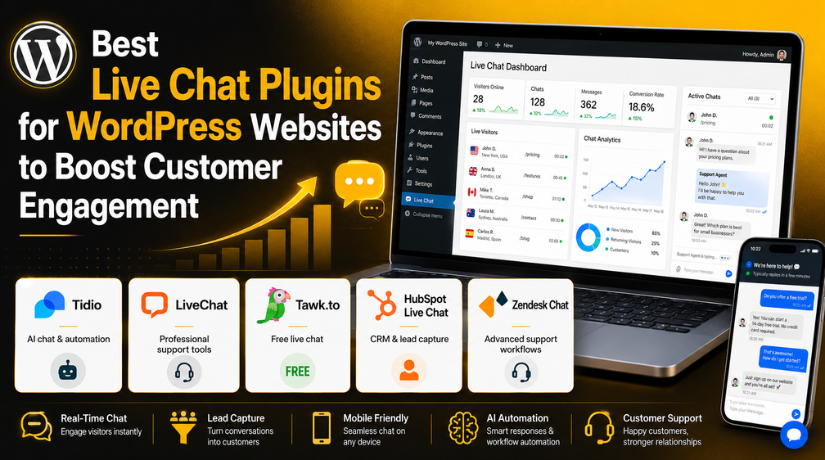
Best Live Chat Plugins for WordPress Websites to Boost Customer Engagement
Introduction
A website is not only an online business card today. It is also a support desk, sales counter, and trust builder. Visitors want quick answers before they buy, book, or contact you. If they do not get help fast, they may leave your website. This is where a WordPress live chat plugin becomes very useful. It adds a simple chat box to your website. Visitors can ask questions without calling or sending emails. This makes communication faster and easier for everyone. Many website owners now search for the best live chat plugin for WordPress because customer support has changed.
People want real-time help while browsing products, services, pricing, or contact pages. A live chat system also helps collect leads from serious visitors. It can answer basic questions and reduce support delays. Some tools also include AI chatbots, WhatsApp support, CRM tools, and automation. These features make live chat more powerful than before. A good WordPress customer support plugin can improve trust and conversions. It can also make your website feel active and helpful. Whether you run a blog, business site, service website, or WooCommerce store, live chat can support your visitors better. In this guide, we will explain the meaning, working, and importance of live chat for WordPress websites.
What Is a Live Chat Plugin for WordPress and Why It Matters
A live chat plugin is a tool for real-time website communication. It adds a small chat box to your WordPress website. Visitors can click the box and send their questions. The website owner or support team can reply quickly. This makes the support process simple and direct. A WordPress chat support plugin helps users without making them search for contact forms. It also removes the need for long email conversations.
Many plugins also allow saved replies, offline messages, and lead forms. Some tools even include AI replies and chatbot support. This makes them useful for both small and large websites. A best chat plugin for WordPress should be easy to install and simple to manage. It should also work well on desktop and mobile devices. Website visitors should not feel confused while using it. The chat box should look clean and match the website design. A good plugin helps visitors get answers at the right time. It also helps businesses collect useful customer details. This makes live chat an important tool for modern WordPress websites.
Why WordPress Websites Need Live Chat for Better User Experience
WordPress websites need fast support more than ever. Visitors compare many websites before making decisions. If your website feels slow or silent, users may leave. A WordPress chat support plugin makes your website feel active. It shows visitors that help is available when needed. This can improve trust within a few seconds. Live chat also helps users find answers without extra steps. They do not need to call or wait for emails. They can ask questions while browsing your website. This saves time and improves the user journey. For businesses, live chat can reduce missed leads.
Visitors Expect Quick Replies Before They Trust a Website
Modern visitors have very little patience online. They want answers within minutes, not hours. If they cannot find support, they may choose another website. This is especially true for service and ecommerce websites. A best chat plugin for WordPress helps solve this problem. It allows visitors to ask questions immediately. The support team can respond while users are still active. This keeps visitors engaged and reduces bounce rates. Quick replies also build strong trust. Users feel that the business is serious and available. This can be important for new visitors. They may not know your brand yet. A helpful chat reply can create a strong first impression.
Live Chat Improves Lead Generation for WordPress Business Websites
Lead generation is important for most business websites. Many visitors are interested but not ready to call. A chat box gives them an easier way to start. A live chat for website WordPress setup can collect useful details. It may ask for name, email, phone, and service need. This helps businesses contact serious visitors later. Live chat also captures leads from users with quick doubts. Some visitors may only need one answer before converting. Without chat, they may leave without contacting you. With chat, you can guide them at the right moment. This can improve inquiries, bookings, and sales calls. Many plugins also connect with CRM and email tools. This makes follow-up faster and more organized. A good WordPress customer support plugin supports both service and sales teams. It helps turn website visitors into real business opportunities.
Live Chat Gives Better Support for WooCommerce Stores and Online Buyers
WooCommerce stores need clear and fast customer support. Online shoppers often have questions before placing orders. They may ask about size, stock, shipping, payment, or returns. If they do not get answers, they may leave the cart. A WordPress live chat plugin can reduce this problem. It helps shoppers get help during the buying process. The support team can answer questions before checkout is abandoned. This can improve sales and customer confidence. Live chat also helps after the order is placed. Customers may ask about delivery updates or payment issues.
Live Chat Is Helpful for Service-Based WordPress Websites
Service-based websites need trust before visitors take action. People may compare prices, experience, and service quality. They may also have questions before booking a consultation. A WordPress chat support plugin helps answer those questions quickly. It can support dental clinics, agencies, consultants, lawyers, salons, and local businesses. Visitors can ask about pricing, timing, service process, or availability. The support team can guide them toward the next step. This may include booking a call or filling a form. Live chat also makes service websites feel more personal. Visitors feel they are talking to a real business. This can reduce hesitation and increase inquiries.
Features to Look for in the Best Live Chat Plugins
AI and Automation Help Save Support Time
AI and automation are useful for busy WordPress websites. Many visitors ask the same questions daily. AI chatbots can answer these questions quickly. They can share links, collect details, and guide users. A good WordPress live chat plugin should support simple automation. This helps your team save time and reduce repeated work.
Mobile-Friendly Chat Improves User Experience
Most visitors now browse websites on mobile phones. So, your chat widget must work well on small screens. It should not cover buttons, menus, or checkout fields. A good live chat for website WordPress setup should feel smooth. Visitors should type and send messages without any issue.
Live Chat Gives Your Website a Better Support Advantage
Live chat makes your website feel active and helpful. Visitors can ask questions without waiting for email replies. A WordPress chat support plugin helps build trust quickly. It also keeps visitors engaged on your website. This can improve leads, sales, and user experience.
Easy WordPress Installation Is Very Important
The plugin should be easy to install and manage. You should not need coding for basic setup. A good best live chat plugin for WordPress should offer clear settings. You should easily change greetings, colors, and offline forms. Simple setup saves time and avoids confusion.
Fast Chat Widget Protects Website Speed
Website speed matters for visitors and SEO. A heavy chat plugin can slow your website. Choose a lightweight plugin with clean loading. The chat widget should work with cache plugins. A good best chat plugin for WordPress should not affect page speed badly.
AI Chatbot Support Makes Replies Faster
AI chatbot support helps answer common questions instantly. It can help visitors after business hours too. A WordPress customer support plugin with AI can collect basic details. Then, your team can reply with better context. This keeps support fast and organized.
WooCommerce Integration Helps Online Stores
WooCommerce stores need fast customer help. Buyers may ask about products, shipping, returns, or payments. A live chat plugin can answer these doubts quickly. It may also reduce cart abandonment. The best live chat plugin for WordPress should support ecommerce needs clearly.
WhatsApp and Multi-Channel Support Add More Contact Options
Many users prefer WhatsApp, Messenger, or email. Multi-channel support lets visitors contact you easily. It also helps your team manage messages in one place. Some live chat WordPress plugin free options offer basic chat only. Paid tools may offer more contact channels.
Offline Messages Help Capture Missed Leads
Your team may not stay online all day. Offline messages help collect visitor questions anytime. The plugin can ask for name, email, and message. This helps you follow up later. A good WordPress chat support plugin should include offline forms.
CRM Integration Helps Manage Leads Better
CRM integration stores visitor details in one place. It helps your team follow up faster. Some plugins connect with HubSpot, Zoho, or Mailchimp. A good live chat for website WordPress plugin should support lead management. This is helpful for service and business websites.
List Of 5 Best Live Chat Plugins for WordPress Websites (Top Picks)
#1 Tidio
Tidio is a popular WordPress live chat plugin for businesses. It combines live chat, AI chatbot, and automation features. Website owners can reply to visitors in real time. They can also use chatbot flows for common questions. Tidio works well for small businesses and WooCommerce stores. It helps answer product, shipping, and checkout questions quickly. This makes it useful for ecommerce websites. The plugin has a clean chat widget and simple dashboard. It also supports email marketing and visitor tracking. Tidio is a good choice for users needing smart automation.
Features
- Live chat widget
- AI chatbot support
- WooCommerce support
- Visitor tracking
- Automated replies
Pros
- Easy to install
- Clean chat design
- Good for beginners
- Useful AI tools
- Supports ecommerce sites
Cons
- Advanced AI may cost extra
- Free plan has limits
- Needs account setup
- Automation needs planning
- Some features may feel advanced
Download Link: Tidio
#2 LiveChat
LiveChat is a strong option for professional customer support. It is useful for businesses that handle many chats daily. This WordPress chat support plugin offers real-time messaging and team tools. It also supports chat history, reports, and integrations. LiveChat works well for service websites and ecommerce stores. It helps support teams answer customers quickly. It also creates a more trusted website experience. The dashboard is clean and easy for agents. Website owners can connect it with many business tools. LiveChat is a good choice for growing WordPress websites.
Features
- Real-time live chat
- Offline contact form
- Team management
- Chat history
- Third-party integrations
Pros
- Professional interface
- Strong support tools
- Good for teams
- Useful lead capture
- Reliable chat system
Cons
- Mostly premium
- Not ideal for tiny budgets
- Needs external account
- Setup may take time
- Advanced tools cost more
Download Link: LiveChat
#3 Tawk.to
Tawk.to is a popular live chat WordPress plugin free option. It helps website owners add live chat without monthly costs. This makes it useful for startups and small websites. Tawk.to supports unlimited agents and basic visitor monitoring. It also includes canned replies and offline messages. Website owners can manage chats from desktop or mobile apps. The plugin is simple and works for basic support needs. It helps businesses talk with visitors in real time. Tawk.to is a good starting point for new WordPress websites. It is useful when budget is limited.
Features
- Free live chat
- Unlimited messaging
- Ticketing system
- Visitor monitoring
- Knowledge base
Pros
- Free to use
- Good for beginners
- Unlimited agents
- Mobile app support
- Useful basic tools
Cons


- Branding removal may cost
- AI features are limited
- Design is basic
- Needs tawk.to account
- Advanced automation is limited
Download Link: Tawk.to
#4 HubSpot Live Chat
HubSpot Live Chat is great for lead-focused websites. It connects chat with HubSpot CRM and marketing tools. This WordPress customer support plugin stores visitor details automatically. It helps sales teams follow up with better context. HubSpot also supports chatbots and email tools. It is useful for service websites, agencies, and B2B businesses. The plugin can help collect leads from important pages. It can also guide users toward forms or sales calls. HubSpot is a good option for websites needing CRM support. It is more than a simple chat tool.
Features
- Live chat
- CRM contact storage
- Chatbots
- Forms and popups
- Website analytics
Pros
- Free plugin available
- Strong CRM tools
- Good for leads
- Helpful analytics
- Works for marketing teams
Cons
- Full system can feel complex
- Advanced features cost more
- Needs HubSpot account
- Setup may take time
- Not only a chat plugin
Download Link: HubSpot Live Chat
#5 Zendesk Chat
Zendesk Chat is useful for support-heavy WordPress websites. It works well for teams handling many customer requests. This live chat for website WordPress tool connects with Zendesk support systems. It helps manage chats, tickets, and customer records. Zendesk Chat is helpful for SaaS, service, and ecommerce websites. It supports team routing and useful reports. This helps agents reply faster and more clearly. It is best for businesses needing structured support. Small websites may find it more advanced than needed. However, growing teams can get strong value from it.
Features
- Live chat support
- Ticketing workflow
- Customer support tools
- Team routing
- Reporting options
Pros
- Good for support teams
- Strong ticket system
- Useful for large websites
- Helps manage requests
- Supports customer workflows
Cons
- Can feel complex
- May cost more
- Needs Zendesk account
- WordPress plugin may need checking
- Not ideal for simple blogs
Download Link: Zendesk Chat
How to Choose the Right Live Chat Plugin for Your WordPress Website
Choose Simple Plugins for Small Business Websites
Small websites should choose easy and low-cost tools. The plugin should include live chat and offline messages. It should also work well on mobile devices. Tawk.to, Tidio, HubSpot, and Formilla are good choices. These tools are simple and helpful for daily support.
Choose Ecommerce-Friendly Plugins for WooCommerce Stores
WooCommerce stores need fast support during shopping and checkout. Customers may ask about products, payment, shipping, or returns. Tidio, LiveChat, JivoChat, and Zendesk can help online stores. The best live chat plugin for WordPress stores should support buyer questions clearly.
Choose CRM-Based Plugins for Service Websites
Service websites need leads, follow-ups, and appointment requests. CRM support helps save visitor details in one place. HubSpot, Zoho SalesIQ, LiveChat, and Crisp are useful options. These plugins can help sales teams manage inquiries better.
Choose Team Features for Large Support Websites
Large websites need routing, reports, and team inbox features. These options help assign chats to the right person. Zendesk, LiveChat, and Crisp are strong choices. They help manage regular customer questions more professionally.
Choose AI Tools for Faster Automatic Replies
AI chat is useful for repeated questions. It can answer basic queries and collect visitor details. Tidio, HubSpot, Crisp, and WPBot are good options. The best chat plugin for WordPress should balance AI and real support.
Start With Free Plans If You Have a Small Budget
A live chat WordPress plugin free option is good for beginners. It helps you test live chat before upgrading. Tawk.to, HubSpot, and Tidio offer helpful starting options. Upgrade only when your traffic and support needs grow.
Best Practices for Using Live Chat on WordPress
Add Live Chat on Important Website Pages
Place live chat where visitors need help most. Add it on home, service, product, pricing, and contact pages. WooCommerce stores should also add it near checkout pages. This helps users ask questions before leaving your website.
Keep Your Chat Greeting Short and Clear
Do not use long or confusing welcome messages. Keep your greeting simple and helpful. You can write, “Hi, need help choosing a service?” A short greeting feels natural and friendly. It also encourages visitors to start chatting.
Use Offline Messages to Capture More Leads
Your team may not stay online all day. Offline forms help collect messages after working hours. Ask for name, email, phone, and question details. This helps your team reply later with proper information.
Set Clear Business Hours for Your Visitors
Tell visitors when your support team is available. This avoids wrong expectations and confusion. You can also use automatic replies after business hours. Clear timing makes your support process more trusted and professional.
Use Canned Replies Without Sounding Robotic
Canned replies save time for common questions. Use them for pricing, shipping, refunds, and service details. Keep each reply short and natural. Edit replies when the question needs a personal answer.
Test Your Chat Widget on Mobile Devices
Your chat box should work smoothly on phones. It should not cover buttons, menus, or checkout fields. Test it on different screen sizes. A clean mobile chat experience improves user trust.
Check Website Speed After Adding Live Chat
Some chat plugins can add extra scripts. Test your website speed after installation. Remove unused chat features if pages feel slow. A good WordPress live chat plugin should support users without hurting performance.
Track Chats, Missed Messages, and Response Time
Review your chat reports regularly. Check missed chats, response time, and common questions. This helps improve your support quality. It also helps you update website content and FAQs.
Train Your Support Team for Better Replies
Your team should reply clearly and politely. Short answers work better than long messages. Support agents should also know when to escalate issues. Good training improves customer trust and satisfaction.
Keep Privacy Rules Clear for Visitors
Live chat may collect personal details. Tell visitors how their data is handled. Add consent where needed. Also update your website privacy policy. This makes your WordPress customer support plugin safer to use.
Conclusion
Live chat is now important for modern WordPress websites. It helps visitors get answers faster. It also improves trust, leads, sales, and support quality. The right plugin depends on your website needs. Small websites can start with free tools. WooCommerce stores should choose ecommerce-friendly plugins. Service websites should choose CRM and lead features. AI tools can also save support time. Choose a plugin that is fast, simple, mobile-friendly, and easy to manage.
Need help choosing or setting up the right live chat plugin? 24x7wpsupport can help you install, configure, and fix live chat plugins. Our team can also resolve plugin conflicts and improve website speed. Visit 24x7wpsupport and get expert WordPress support today.
Related posts:

Best WordPress Paywall Plugins (Free and Paid Options)

Top 5 WordPress Backup Plugins for Protecting Your Site

Most Feature Rich and Free WordPress Table Plugins Installation with Set Up

How to Add Autocomplete Search to Your WordPress Website?

Best Contest and Voting Plugins for WordPress Websites (Latest and Expert Picks)

Brian is a WordPress support specialist and content contributor at 24×7 WP Support. He writes practical, easy-to-follow guides on WordPress troubleshooting, WooCommerce issues, plugin and theme errors, website security, migrations, performance optimization, and integrations. With a focus on solving real website problems, Brian helps business owners, bloggers, and online store managers keep their WordPress sites running smoothly.
