
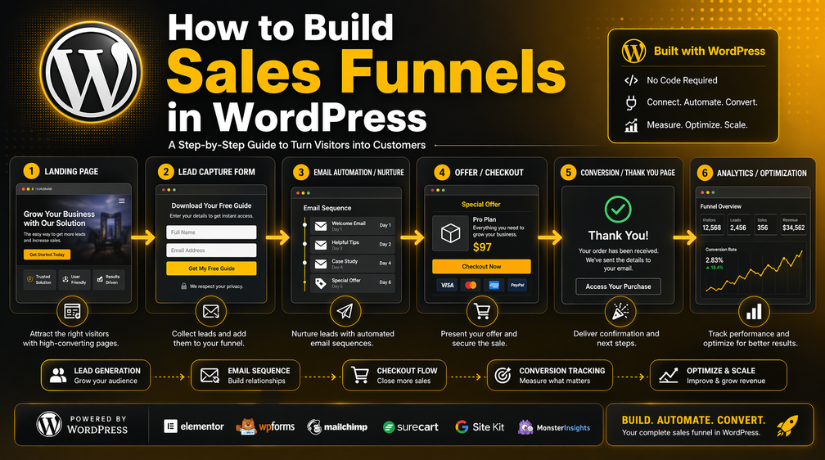
How to Build Sales Funnels in WordPress (Step-by-Step Guide)
Introduction
Getting website traffic is helpful, but traffic alone does not grow sales. Many visitors land on a website, look around, and leave without action. That is why businesses now need a smarter path for conversions. A good funnel gives visitors a clear journey to follow. It moves them from interest to action without confusion. This is where a WordPress sales funnel becomes very useful. WordPress is no longer limited to blogs and simple pages. It now supports lead generation, product sales, bookings, and email growth.
With the right setup, you can guide visitors step by step. You can show an offer, collect a lead, or close a sale. This is why many businesses now want to build a sales funnel in WordPress instead of using scattered pages. A proper funnel also helps improve user focus and page results. Once you know how funnels work, the rest becomes easier to plan. A strong funnel can help service businesses, online stores, coaches, and agencies. It can also support local businesses that want more leads from their site.
In this guide, you will learn what a funnel really means in WordPress. You will also see why it works better than a normal page flow. This will help you choose the right direction before using any sales funnel builder tool on your website.
What Is a Sales Funnel in WordPress and How It Works?
A sales funnel is a step-by-step path for your visitors. It guides them toward one clear action on your website. That action may be a signup, booking, or product purchase. A normal website gives users many choices and many directions. A funnel is different because it focuses on one goal. This is why a WordPress sales funnel often converts better. It removes distractions and keeps visitors focused on the next step. Most funnels move through interest, trust, decision, and action.
WordPress supports this flow with pages, forms, and plugins. You can create landing pages, thank-you pages, and checkout pages. You can also use a funnel builder WordPress plugin for setup. Some businesses use it for leads. Others use it for product sales. A simple example is easy to understand. A visitor clicks a link and reaches an offer page. The page explains the offer and asks for one action. Then the visitor fills a form or completes a purchase. After that, they see a thank-you or next-step page. That is the basic idea behind how to create a funnel in WordPress. A strong WordPress marketing funnel makes the user journey simple. A sales funnel builder helps guide visitors with less confusion and better results.
Why You Should Use a Sales Funnel in WordPress for Better Conversions
Better Focus on One Business Goal
A sales funnel helps visitors move toward one clear action. That action may be a signup, booking, or product purchase. A normal website often shows too many options at once. This can confuse visitors and reduce conversions. A WordPress sales funnel removes extra distractions and keeps the user focused. This makes the journey clearer and improves the chance of action.
Easier Lead Generation for Service Businesses
Many service businesses need leads more than direct online sales. A funnel helps collect those leads in a simple way. You can guide visitors from an ad, blog, or page to a form. This structure works well for consultations, quote requests, and inquiries. A good WordPress funnel builder makes this process easier to manage and improve.
Better Product Sales With a Guided Buying Path
A funnel is also useful for selling products in a smarter way. Instead of sending users through many pages, it gives them a direct path. That path may include a landing page, checkout page, and thank-you page. This setup reduces confusion and keeps users moving forward. That is why many businesses build sales funnels in WordPress for better conversions.
Full Control Over Pages, Content, and Design
WordPress gives you strong control over how your funnel looks and works. You can edit content, change layouts, and adjust calls to action easily. You are not forced to follow one fixed template or platform rule. This gives businesses more freedom to build a funnel their own way. A sales funnel builder inside WordPress supports that flexibility very well.
Easy Integration With Useful Marketing Tools
A funnel works best when connected with the right business tools. WordPress supports forms, email platforms, CRM tools, and payment systems well. This helps businesses manage leads and follow-up from one place. You can also connect WooCommerce for product selling funnels. A strong WordPress marketing funnel becomes easier to manage with these integrations.
Cost-Friendly Option for Growing Businesses
Many outside funnel platforms charge high monthly fees for basic features. WordPress can be more budget-friendly for many business owners. You can start with a basic setup and grow over time. This is useful for small businesses with limited marketing budgets. A good funnel builder WordPress plugin can offer strong value without high cost.
Helpful for Both SEO and Funnel Marketing
WordPress is already known as a strong platform for SEO. This gives it an added advantage for funnel building. You can attract traffic through blog posts and send users into your funnel. That means your content and funnel can work together as one system. A WordPress landing page funnel becomes even stronger when supported by search traffic.
Easier to Scale as Your Business Grows
A small business may start with one simple funnel only. Later, it may need more funnels for services, products, or offers. WordPress makes that growth easier to manage over time. You can add new pages, plugins, and funnel steps as needed. This is one reason many users learn how to create funnels in WordPress early.
Useful for Different Types of Businesses
A funnel is not only for online stores or large brands. It also works well for coaches, agencies, consultants, and local businesses. Each business can create a funnel based on its own goals. Some need more calls booked, while others want more product sales. A WordPress sales funnel gives that flexibility across many business types.
Better Tracking and Improvement Over Time
A funnel makes it easier to track what visitors do on your site. You can study clicks, form fills, drop-offs, and final conversions. This helps you see what works and what needs improvement. Over time, small changes can bring better results from the same traffic. That is why using a funnel in WordPress is a smart long-term step.
Does WordPress Have a Built-In Funnel Builder?
No, WordPress does not come with a built-in sales funnel builder by default. It gives you the base website system, but not a full funnel setup. To create funnel pages and guided user paths, you usually need extra tools. That is where a funnel builder WordPress plugin becomes useful. These tools help you build landing pages, forms, checkouts, thank-you pages, and follow-up steps. Some tools are simple page builders with basic funnel use. Others are full sales funnel builder options with advanced features. A WordPress landing page funnel can be built with the right plugin and setup.
Some plugins focus on lead generation for service-based businesses. Others work better for WooCommerce stores and product selling funnels. So, if you ask how to create a funnel in WordPress, the answer is simple. You use WordPress with the right funnel-building tools. A WordPress funnel builder helps turn your website into a conversion-focused system. It gives structure to your pages and makes the user journey clearer. That is why many businesses now use a funnel builder WordPress plugin for better results.
What You Need to Prepare Before Building a Sales Funnel in WordPress
Before you build any funnel, you need a clear plan first. Many businesses rush into design and skip the basic setup stage. This often leads to weak pages and poor conversion results later. A good funnel works best when the goal, offer, and path are clear. If the base is strong, the funnel becomes easier to build. It also becomes easier to test, improve, and scale over time. That is why preparation matters before you build a sales funnel in WordPress.
Define a Clear Goal Before You Start the Funnel Setup
Your funnel should focus on one main goal from the beginning. That goal may be lead generation, product sales, or call booking. Some businesses want email signups. Others want direct purchases or service inquiries. When the goal is clear, every page becomes easier to plan. A strong WordPress sales funnel always starts with one focused action. If you try to do too much, visitors may feel confused. A simple goal makes your WordPress marketing funnel more effective.
Understand Your Target Audience Before Creating Funnel Pages
You also need to know who your funnel is for. Think about the people you want to attract to your page. Understand their problem, their need, and their buying intent. This helps you write better headlines, offers, and calls to action. A good WordPress landing page funnel should speak to the right audience clearly. If the message matches the user’s needs, conversions improve faster. This is a basic but very important part of funnel planning.
Prepare a Strong Offer That Gives Visitors a Reason to Act
No funnel works well without a clear and useful offer. Your offer should give people a strong reason to continue. It may be a free guide, a discount, a demo, or a consultation. It can also be a product bundle or a limited-time service deal. The offer should match the needs of your audience well. A sales funnel builder helps guide visitors, but the offer drives action. That is why a strong offer must be ready before setup begins.
Set Up the Basic WordPress Website and Technical Essentials First
Before building the funnel, your website setup should be ready. You need a domain, quality hosting, and a working WordPress installation. Your site should also use SSL for trust and security. A fast and mobile-friendly theme is also very important today. These basics support the full funnel experience from start to finish. A WordPress funnel builder works better when the site foundation is stable. Slow pages and poor setup can hurt the funnel from day one.
Choose the Right Tools and Plugins for Your Funnel Structure
WordPress does not include full funnel tools by default. That is why you need the right plugin setup first. You may need a funnel builder WordPress plugin, form plugin, or page builder. If you sell products, WooCommerce may also be required. You may also need email and tracking tool integrations. These tools help you create pages, capture leads, and manage actions. Choosing the right setup early makes the funnel process smoother later. It also helps you understand how to create a funnel in WordPress the right way.
Plan the Funnel Flow Before You Start Building the Pages
A funnel should not begin with random page design decisions. First, you should map the full journey in a simple way. Think about where users will enter and what they should do next. A basic flow may include a landing page, action page, and thank-you page. Some funnels also include email follow-up or upsell pages. When the path is planned early, the funnel becomes more focused. This step helps your WordPress sales funnel feel smooth and clear.
How to Build Sales Funnels in WordPress (Complete Guide)
Step 1: Set One Clear Funnel Goal


- Start with one goal before building the funnel.
- Choose the main action you want from visitors.
- This action may be a signup, booking, or sale.
- Do not mix many goals in one funnel.
- A clear goal keeps the funnel simple and focused.
- It also helps improve the full WordPress sales funnel.
Step 2: Know Who the Funnel Is For
- Understand the people you want to target.
- Learn their problem, need, and interest level.
- Think about what solution they are looking for.
- Match your message with their real need.
- This makes the funnel more useful and relevant.
- It is a key step in how to create a funnel in WordPress.
Step 3: Prepare the Main Offer
- Create one strong offer for the funnel.
- The offer should give visitors a reason to act.
- It may be a free guide, service, or discount.
- It can also be a product or trial offer.
- A clear offer improves attention and response.
- This makes your WordPress marketing funnel stronger.
Step 4: Choose the Right WordPress Tools
- Select the tools needed for funnel setup.
- You may need a WordPress funnel builder.
- You may also need a page builder or form plugin.
- Use WooCommerce if you plan to sell products.
- Add email and tracking tools if needed.
- The right setup makes the funnel easier to manage.
Step 5: Create the Landing Page
- Build a page focused on one main offer.
- Write a strong headline with a clear message.
- Add a short text that explains the main benefit.
- Place one clear call-to-action on the page.
- Remove extra links and distractions from the layout.
- A good WordPress landing page funnel starts here.
Step 6: Add the Form or Checkout Page
- Create the action page after the landing page.
- Use a short form for lead generation funnels.
- Use a clean checkout page for product funnels.
- Ask only for the details you really need.
- Keep the process simple and easy to complete.
- This step is important in every sales funnel builder setup.
Step 7: Create a Thank-You Page
- Send users to a thank-you page after action.
- Confirm that their form or order was successful.
- Tell them what will happen next.
- Add one more useful next step if needed.
- This may be a guide, booking link, or offer.
- It helps your WordPress sales funnel move smoothly.
Step 8: Connect Email Follow-Up
- Set up email follow-up after the first action.
- Send a welcome email to new leads or buyers.
- Add reminder or next-step emails when needed.
- Keep users engaged after signup or purchase.
- This helps build trust and improve conversions.
- Email support makes the funnel more effective.
Step 9: Check Mobile Experience
- Review the funnel on mobile devices carefully.
- Make sure every page loads fast and looks clean.
- Check button size and form usability on mobile.
- Keep text easy to read on smaller screens.
- A poor mobile experience can reduce conversions.
- This matters in any WordPress funnel builder process.
Step 10: Test the Full Funnel
- Test the full funnel from start to finish.
- Check all buttons, forms, and page links.
- Test checkout flow if you sell products.
- Check thank-you pages and email delivery too.
- Test both desktop and mobile versions.
- This step helps build the sales funnel in WordPress properly.
Step 11: Track Funnel Performance
- Monitor how visitors move through the funnel.
- Check page views, clicks, and form submissions.
- Track sales, conversions, and drop-off points.
- Use the data to find weak funnel steps.
- This helps you improve results over time.
- A funnel builder WordPress plugin works better with tracking.
Step 12: Improve the Funnel Over Time
- Review performance after the funnel goes live.
- Update weak sections based on real user behavior.
- Improve headlines, offers, or call-to-action buttons.
- Shorten forms if too many users leave.
- Keep testing small changes for better results.
- A strong WordPress sales funnel improves step by step.
Common Mistakes to Avoid When Building Sales Funnels in WordPress
Setting Too Many Goals in One Funnel
A funnel should guide visitors toward one clear action only. Many businesses try to collect leads, sell products, promote services, and grow email lists in the same path. This often confuses visitors and weakens the full journey. A strong WordPress sales funnel works better when the goal stays simple and focused.
Not Understanding the Target Audience
A funnel cannot perform well if the message feels too general. You need to know who your visitors are and what they want. If your page does not match their problem or need, they may leave quickly. This is a major mistake when trying to build a sales funnel in WordPress successfully.
Using a Weak or Unclear Offer
Even a well-designed funnel can fail with a weak offer. Visitors need a clear reason to take the next step. If the offer feels confusing, common, or low in value, conversions will drop. A strong offer is a key part of every WordPress marketing funnel.
Writing a Poor Landing Page Headline
The headline is often the first thing visitors read on the page. If it is weak, unclear, or too broad, users may not continue. A strong headline should explain the main value quickly and clearly. A focused WordPress landing page funnel needs a headline that catches attention fast.
Adding Too Many Links and Distractions
A funnel page should keep visitors focused on one next step. Too many links, menu items, and side options can break that flow. When users see many directions, they may leave without action. A good sales funnel builder setup removes distractions and keeps the path clear.
Making Forms Too Long and Complicated
Long forms can reduce conversions very quickly on funnel pages. Many visitors do not want to fill in extra details too early. Ask only for the information you really need at that stage. Short forms usually work better in a WordPress funnel builder setup.
Creating Slow-Loading Funnel Pages
A slow funnel page can push visitors away before they act. Heavy images, extra scripts, and poor hosting can hurt speed badly. Fast pages improve user experience and support better conversions. Speed matters in every WordPress sales funnel from first click to final action.
Ignoring Mobile User Experience
Many visitors now open funnel pages on mobile devices first. If the layout breaks, loads slowly, or feels hard to use, users may leave. Buttons should be easy to tap and forms should stay simple. Mobile design is a big part of how to create a funnel in WordPress the right way.
Not Adding Trust Signals on Funnel Pages
Visitors often need proof before they take action online. If the page has no trust signals, they may not feel safe enough to continue. Reviews, testimonials, badges, and clear contact details can help build confidence. A strong WordPress marketing funnel should always support trust.
Skipping the Thank-You Page Strategy
Some businesses treat the thank-you page like an ending only. In reality, it is also a useful next-step page. You can confirm the action, explain what happens next, and add another helpful offer. This small step can improve the full WordPress sales funnel experience.
Conclusion
Building a sales funnel in WordPress is a smart step for business growth. It helps turn visitors into leads, customers, and repeat buyers. A good funnel is not just about design or plugins. It is about creating one clear path for every visitor. When the goal is clear, the message becomes stronger. When the steps are simple, users take action more easily. That is why a well-planned WordPress sales funnel can improve real results. You do not need to make the funnel complex at the start.
Begin with one offer, one audience, and one clear action. Then improve each step over time with testing. Focus on the landing page, form or checkout, follow-up, and speed. Also make sure the funnel works well on mobile devices. Small changes in the right places can improve conversions faster. A strong funnel helps your business grow with better control. It also helps you use your website traffic more effectively. If you want expert help with your funnel, 24x7wpsupport is here for you.
We help businesses build and improve WordPress sales funnels with a practical approach. Our team can support landing page setup, funnel design, plugin setup, WooCommerce funnel flow, speed improvement, and conversion-focused changes. We work to make your funnel clear, smooth, and result-driven. If you want to create a better funnel for your business website, visit 24x7wpsupport today. Let our team help you build a professional WordPress funnel that supports more leads, more sales, and better long-term growth.
Related posts:

HOW TO SOLVE ERROR ESTABLISHING A DATABASE CONNECTION IN WORDPRESS?

How To Put Meta Tags In WordPress

How to Connect IDX in WordPress: Complete Step By Step Guide for Beginners
How to Create an Interactive Map in WordPress (Beginner’s Guide)
How to Set Up Easy Appointments in WordPress: Complete Installation Guide

Brian is a WordPress support specialist and content contributor at 24×7 WP Support. He writes practical, easy-to-follow guides on WordPress troubleshooting, WooCommerce issues, plugin and theme errors, website security, migrations, performance optimization, and integrations. With a focus on solving real website problems, Brian helps business owners, bloggers, and online store managers keep their WordPress sites running smoothly.
