
Elementor vs Thrive Architect: Which One Should You Use?
Introduction: Why This Comparison Matters
Choosing the right page builder can shape your whole website experience. Many WordPress users want fast design control without touching code. That is why this Elementor vs Thrive Architect comparison matters so much. Both tools help you build pages with a visual editor. Both save time and reduce manual design work for users. Still, they are not made for exactly the same purpose.
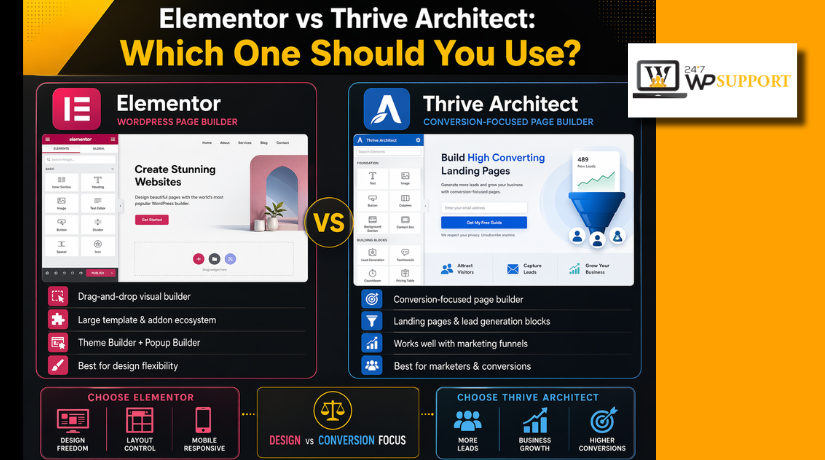
Some users want full website design flexibility and easy editing. Others want pages that support leads, offers, and conversions. That is where the real decision begins for most users. The difference between Elementor and Thrive Architect becomes clear when you compare their main purpose. One tool fits wider design needs across many website pages. The other focuses more on pages built for marketing results. So, if you are asking which is better Elementor or Thrive Architect, the answer depends on your goal. This guide helps you understand that choice in a simple way. It stays focused only on this builder comparison topic.
What Elementor Is Best Known For
Elementor is best known for flexible visual website design. It gives users drag-and-drop control over many page sections. You can build homepages, service pages, blog layouts, and more. It is popular with users who want creative design freedom. It also works well for people building a full website. That makes Elementor Pro vs Thrive Architect an important comparison for serious site owners. Elementor often suits users who want one builder for many tasks.
What Thrive Architect Is Best Known For
Thrive Architect is best known for conversion-focused page building. It is often used for landing pages, offers, and lead capture. The builder is designed for users who care about actions. That includes sign-ups, clicks, sales, and campaign page results. It is less about broad site design alone. It is more about building pages with a clear purpose. This is why many users compare Elementor vs Thrive Architect for landing pages before choosing one. Thrive Architect appeals strongly to marketers and conversion-focused website owners.
Which One Should Most Users Choose?
The right builder depends on what your website needs most. This is the simplest answer in the Elementor vs Thrive Architect debate. If you want broad website design control, Elementor often fits better. If you want stronger conversion-focused pages, Thrive Architect often stands out. So, if you ask which is better Elementor or Thrive Architect, the answer is not the same for everyone.
Elementor usually suits users building many page types across one site. It works well for business pages, blogs, service pages, and stores. Thrive Architect usually suits users creating pages with one clear goal. That goal may be more sign-ups, more leads, or more sales. This is the core difference between Elementor and Thrive Architect for most users. One builder feels wider in purpose. The other feels sharper in marketing focus.
A simple way to choose is this:
- Pick Elementor if you want broader website design freedom.
- Pick Thrive Architect if you want stronger marketing page focus.
- Pick based on your real website goal, not feature hype.
Main Differences in Editing Experience and Workflow
The editing experience plays a big role in daily website work. A builder may look strong on paper but feel slow in use. That is why workflow matters when comparing both tools.
Elementor gives a more open design workflow for many users. It feels built for visual editing across different page sections. You can move through layouts with a broader design mindset. This often helps users working on full websites, not single campaigns. That is one reason many compare Elementor Pro vs Thrive Architect before choosing a premium builder.
Thrive Architect feels more focused during the editing process. Its workflow often pushes users toward action-based page building. Instead of thinking about full site design first, users often think about results first. That could mean clicks, leads, or conversions from one page.
For many users, the workflow difference looks like this:
- Elementor feels more flexible during page design.
- Thrive Architect feels more focused during campaign page creation.
- Elementor supports wider layout planning across a website.
- Thrive Architect supports faster decision-making for conversion pages.
This also affects Elementor vs Thrive Architect for beginners. Some beginners may like Elementor’s broader visual freedom. Others may prefer Thrive Architect’s clear conversion-based structure. The better workflow depends on how you like to build pages every day.
Which One Gives Better Design Flexibility
Design flexibility matters when you want full control over page layout. It affects how easily you shape each section and block. In the Elementor vs Thrive Architect comparison, this is a major point. Both builders let you design pages visually without writing code. Still, the level of design freedom feels different in daily use.
Elementor often feels more open during custom page design work. It gives users wider control over spacing, layout structure, and styling. This helps when building service pages, homepages, and long website sections. Users who want one builder for many design tasks often prefer this. That is why many people search for the difference between Elementor and Thrive Architect before choosing.
Thrive Architect also gives strong design control for page creation. However, its design flow feels more connected to marketing page goals. It helps users create pages that look clear and conversion-focused. The builder supports clean layouts, but its main strength is not wide site styling. It feels more focused on page performance than broad design freedom.
A simple way to see this difference is below:
- Elementor fits users who want broader visual design control.
- Thrive Architect fits users who want focused page design.
- Elementor works better for mixed website page types.
- Thrive Architect works better for purpose-driven page layouts.
Which One Works Better for Landing Pages and Conversions
Landing page strength is another big part of this comparison. Many users care less about full site design and more about results. They want pages that drive clicks, leads, sign-ups, or sales. That is where Elementor vs Thrive Architect for landing pages becomes important.
Thrive Architect usually feels stronger for conversion-focused landing page work. Its page flow supports action-based design from the start. It is a good fit for webinar pages, lead pages, and offer pages. Users building campaigns often find its focus helpful and direct.
Elementor can also build strong landing pages with clean design. It offers flexibility and creative layout control for many page styles. However, Thrive Architect often feels more naturally built for conversion work. This matters when asking which is better Elementor or Thrive Architect for marketing goals.
If your main goal is landing page performance, this summary helps:


- Choose Thrive Architect for conversion-focused landing pages.
- Choose Elementor for flexible landing page design freedom.
- Compare Elementor Pro vs Thrive Architect if premium features matter most.
Which One Is Better for Beginners
Beginners often want a builder that feels simple from day one. They do not want extra confusion during setup or page editing. In Elementor vs Thrive Architect for beginners, ease of use matters a lot. A builder may look powerful, but still feel hard to learn. That is why the first editing experience matters so much.
Elementor usually feels easier for users starting their first website. Its visual editing style feels familiar and easy to follow. Users can drag sections, adjust settings, and view changes quickly. This makes page building feel more comfortable during early use. It also helps users who want to test ideas freely. For many new users, that makes Elementor easier to approach.
Thrive Architect is also visual and easy to work with. However, its structure often feels more goal-driven from the start. That can help users who already know what page they want. If someone is building a lead page or offer page, the builder can feel clear and direct. Still, some first-time users may need more time to adjust.
A simple beginner view looks like this:
- Elementor feels more open for learning and exploring.
- Thrive Architect feels more guided for conversion page creation.
- Elementor suits wider beginner website needs.
- Thrive Architect suits focused beginner marketing goals.
This is an important difference between Elementor and Thrive Architect for new users.
Pricing and Value for Different Types of Users
Pricing should never be judged by cost alone. Real value depends on what the user needs most. In Elementor Pro vs Thrive Architect, value changes by website goal. One user may need broad design tools across many pages. Another may only need strong landing page performance.
Elementor often brings better value for users building full websites. It fits people who want design flexibility across many page types. That includes service pages, blogs, and business layouts. Thrive Architect often brings better value for users focused on conversions. It suits marketers who care most about page actions and results.
So, which is better Elementor or Thrive Architect in value terms? The answer depends on your purpose, not just the price tag. If your goal is website-wide design, Elementor may feel smarter. If your goal is conversions, Thrive Architect may feel stronger. That is the real Elementor vs Thrive Architect value decision for most users.
Best Choice Based on Website Goal
The best builder depends on what you want your website to do. This is the most practical way to solve the Elementor vs Thrive Architect question. Instead of comparing features only, match the builder to your goal.
Choose based on these common website needs:
- For a business website: Elementor is often the better choice. It works well for service pages, homepages, blogs, and more.
- For landing pages: Thrive Architect often feels more focused and direct. It supports pages built for leads, sign-ups, and sales.
- For beginners: Elementor usually feels easier during early website building. Its editing flow often feels more open and simple.
- For marketers: Thrive Architect often makes more sense for campaigns. It keeps the page structure focused on conversion goals.
- For wider design control: Elementor usually gives more freedom. It suits users building many page types across one site.
This is where the difference between Elementor and Thrive Architect becomes easier to understand. One builder supports broader website design needs. The other supports more focused marketing page goals. So, when people ask which is better Elementor or Thrive Architect, the better answer depends on the project type.
If your main focus is campaign building, compare Elementor vs Thrive Architect for landing pages carefully. If your main focus is easy learning, review Elementor vs Thrive Architect for beginners more closely.
Conclusion
There is no single winner for every WordPress user. Both builders support different website goals in different ways. That is the real answer in the Elementor vs Thrive Architect comparison.
The Elementor Pro vs Thrive Architect choice becomes easier when your goal is clear. Elementor is often a better fit for users who want wider website design flexibility. Thrive Architect often makes more sense for users who care more about conversion-focused page building. So, when asking which is better Elementor or Thrive Architect, the right answer depends on how you plan to use the builder on your site.
Before making your final choice, think about your real needs. Focus on design style, page goals, workflow comfort, and future website plans. That will help you choose the builder that fits best.
If you need expert help choosing the right builder or setting it up properly, contact 24x7WPSupport. Our team can help you build, improve, and manage your WordPress website with less stress and better results.
FAQs
1. What is the main difference between Elementor and Thrive Architect?
The main difference is their primary focus. Elementor is more flexible for full website design. Thrive Architect is more focused on landing pages and conversion-based content. If you want wider design freedom, Elementor often fits better. If you want pages built for leads and sales, Thrive Architect may suit you more.
2. Which is better Elementor or Thrive Architect for beginners?
Elementor is usually easier for beginners who want to build a full website. Its editor feels more open and simple during early use. Thrive Architect can also work well for beginners, but it feels more focused on marketing pages. Your choice depends on what kind of website you want to build first.
3. Is Elementor better than Thrive Architect for landing pages?
Not always. This depends on your goal. Elementor gives more design freedom for landing pages. Thrive Architect often feels more direct for conversion-focused landing pages. If your main goal is lead generation or campaign results, Thrive Architect may feel stronger. If you want more layout flexibility, Elementor may be the better option.
4. Should I choose Elementor Pro vs Thrive Architect for a business website?
For a business website, Elementor Pro is often the stronger choice. It works well for service pages, homepages, blog pages, and more. Thrive Architect is helpful when your site depends heavily on landing pages and offers. If your website needs broader design control, Elementor Pro usually makes more sense.
5. Can I use Elementor or Thrive Architect without coding?
Yes, both builders are made for visual page building without coding. You can create layouts, edit sections, and style pages using drag-and-drop tools. Basic WordPress knowledge still helps during setup and publishing. But in most cases, you can build professional pages without writing code.




Brian is a WordPress support specialist and content contributor at 24×7 WP Support. He writes practical, easy-to-follow guides on WordPress troubleshooting, WooCommerce issues, plugin and theme errors, website security, migrations, performance optimization, and integrations. With a focus on solving real website problems, Brian helps business owners, bloggers, and online store managers keep their WordPress sites running smoothly.
