
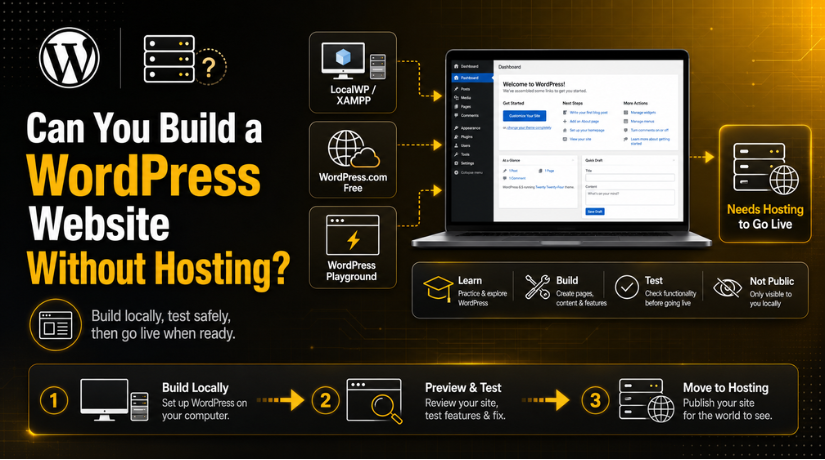
Can You Build a WordPress Website Without Hosting?
Introduction
If you’re new to WordPress, the question makes complete sense: do you actually need to pay for web hosting before you can start building? The short answer is — it depends on what you want to accomplish. In 2026, there are more ways than ever to get a WordPress site off the ground without a traditional hosting plan. But each option comes with real trade-offs you need to understand before you commit to a direction.
This guide walks you through exactly what’s possible, what each approach limits you to, and when it finally makes sense to invest in proper hosting. By the end, you’ll know precisely which path is right for your situation.
What “Hosting” Actually Means for WordPress
Before diving in, it helps to be clear about what web hosting does. Hosting is the service that stores your website files on a server connected to the internet, making your site accessible to anyone with a browser and your domain name. Without hosting, your WordPress site either lives only on your own computer or exists in a temporary online environment that nobody else can reliably reach.
WordPress itself comes in two flavors. WordPress.org is the free, open-source software you download and install wherever you want — a local computer, a server, anywhere. WordPress.com is a hosted service that handles the infrastructure for you. Understanding this distinction is key to everything that follows.
If you’ve ever wondered what WordPress actually is and how it works, the fundamentals will help you make smarter decisions about hosting too.
Option 1: Install WordPress Locally on Your Computer
The most powerful no-hosting approach is running WordPress directly on your own machine. This is called a local development environment, and it turns your computer into a private web server. Tools like LocalWP, XAMPP, MAMP, and WAMP create the necessary server infrastructure (PHP, MySQL, Apache or Nginx) and let you install a full, unrestricted version of WordPress.org.
How to Set It Up
LocalWP is the easiest starting point in 2026. You download the free application, click “Create a new site,” give it a name, and within minutes you have a fully functional WordPress dashboard running locally. XAMPP and MAMP are slightly more manual but offer more control over server settings — useful for developers who need to match a specific production environment.
Once installed locally, you can do virtually everything you could do on a live site: install any theme, activate any plugin, build out pages with Gutenberg or a page builder, configure menus, upload media, and fine-tune settings. You’re working with real WordPress, not a watered-down version.
Limitations of Local Development
The catch is significant. A locally hosted site is completely invisible to the outside world. Nobody else can visit it, Google cannot crawl it, and you cannot share a preview link with a client. It’s a private sandbox. Any emails WordPress tries to send (password resets, notifications) also typically fail without extra configuration, because your local machine isn’t a legitimate mail server.
Local development is best for: learning WordPress without risk, building a site before it goes live, testing plugins and themes safely, and demonstrating concepts to yourself or your team.
Option 2: WordPress.com Free Plan
WordPress.com offers a free plan that technically lets you publish a website accessible to anyone on the internet — without paying for separate hosting. Your site lives on WordPress.com’s infrastructure, and you get a subdomain like yourname.wordpress.com.
What You Get
The free plan gives you a basic website with a handful of themes, the Gutenberg block editor, and a small set of built-in tools. You can publish posts, create pages, and have a real presence online. This is genuinely useful for personal blogs, hobby sites, or anyone just testing the waters.
What You Lose
The restrictions are substantial. You cannot install third-party plugins — meaning no WooCommerce, no contact form plugins of your choice, no SEO plugins like Yoast or Rank Math. Your theme options are locked to WordPress.com’s curated library. WordPress.com places its own advertising on free sites, and you have no control over those ads. Custom domain names require a paid upgrade. Advanced customization through CSS is also restricted.
For anyone building a business site, portfolio, or anything they intend to monetize or optimize for search engines, the free WordPress.com plan quickly becomes frustrating. You’re essentially renting a tiny apartment when you need a house you can renovate.
It’s also worth noting that many people confuse “free WordPress” with “free hosting.” Even WordPress.com’s paid plans are a form of hosting — you’re paying for the infrastructure, just bundled differently. If you’ve looked into this and wondered whether WordPress is truly free to use, the full breakdown covers exactly what costs are involved at every level.
Option 3: WordPress Playground — Browser-Based WordPress
WordPress Playground is a newer tool that runs an entire WordPress environment directly inside your web browser using WebAssembly technology. You navigate to playground.wordpress.net, and within seconds you have a working WordPress dashboard — no installation, no account, no hosting required whatsoever.
When Playground Makes Sense
WordPress Playground is genuinely impressive for quick experimentation. Want to test a plugin before installing it on your live site? Open Playground, install it, and see what happens. Need to quickly demonstrate a feature to someone? Share a Playground link. Curious about a new Gutenberg block pattern? Playground is the fastest way to check.
The Big Limitation
Everything in WordPress Playground is temporary. Close the browser tab and it’s gone. There’s no persistent database, no saved files, and no way to take your Playground site live as-is. It’s a scratchpad, not a building platform. For anything beyond quick tests and demos, it falls short.
Option 4: Free Hosting Tiers from Traditional Hosts
Some web hosts offer free or extremely low-cost tiers that technically give you hosting without requiring a credit card. In 2026, these options are rarer and come with heavy limitations: no custom domain, limited storage, slow servers, ads injected into your pages, and unreliable uptime.
These aren’t really “no hosting” — they are very low-quality hosting, and the limitations they impose are often worse than what you’d experience with a reputable paid plan. For any serious project, this path tends to cause more problems than it solves.


What You Actually Cannot Do Without Proper Hosting
Let’s be direct about the hard limits, regardless of which no-hosting option you choose:
You cannot rank on Google. Search engines index publicly accessible URLs on real servers. A local site is invisible to Google by definition, WordPress Playground is temporary and noindexed, and free WordPress.com subdomains carry subdomain authority that limits SEO effectiveness significantly. Building an SEO strategy without hosting is building on sand. Understanding your free SEO options for WordPress matters most once you have a real hosting environment to work in.
You cannot process payments. WooCommerce, Stripe integrations, PayPal buttons — these require a publicly accessible, secure (HTTPS) URL on a real server. No real hosting means no eCommerce, period.
You cannot reliably send or receive email. WordPress contact forms, WooCommerce order notifications, user registration emails — all depend on server-side mail configuration that doesn’t exist in local or temporary environments.
You cannot use a custom domain properly. While you can point a domain to some free services, a subdomain (yourname.wordpress.com) is not the same as owning yourbrand.com on your own server. Trust, branding, and SEO all suffer.
You cannot scale or recover from issues. Without managed hosting, you have no backups, no uptime monitoring, no security scanning, and no support team when something breaks.
When Building Without Hosting Makes Total Sense
Despite all of the above, there are clear, legitimate reasons to build WordPress without hosting:
You’re learning WordPress — Local development is the perfect environment. You can break things, experiment, and rebuild without consequences. It’s how many professional developers started.
You’re developing for a client — Building on LocalWP or XAMPP lets you construct an entire site, get approval, and then migrate it to hosting when the client is ready to pay. This is standard practice in professional WordPress development.
You’re testing before updating a live site — Never test major plugin updates or theme changes directly on a live site. A local clone is the safe way to verify everything works before pushing changes.
You’re exploring WordPress for the first time — If you’re not sure whether WordPress is the right platform for your project, spending a few hours with a local installation costs nothing and teaches you more than any tutorial could.
When You Absolutely Need Hosting
The moment any of the following apply to your situation, you need real hosting: you want real visitors to find and use your site, you’re running a business or selling products or services, you care about appearing in Google search results, you need a professional custom domain, you’re collecting leads or user data, or you need reliable uptime and site performance.
The good news is that quality managed WordPress hosting in 2026 is more affordable than most beginners expect. If you’re wondering what you’ll actually spend, a full breakdown of WordPress hosting costs in 2026 will give you a realistic picture across all plan types — from shared hosting to fully managed solutions.
How to Move From Local to Live Hosting
One of the best things about the local development approach is that it’s not a dead end. When you’re ready to go live, migration is straightforward. Plugins like Duplicator, All-in-One WP Migration, and LocalWP’s built-in export tools make it possible to take everything you’ve built locally and transfer it to a hosting environment with minimal friction.
The basic process involves exporting your local database and files, importing them into your hosting account, updating the site URL settings, and configuring your domain. A good managed WordPress host will often provide staging environments and migration assistance that make this even smoother.
The Bottom Line for 2026
If your goal is to learn WordPress, test a concept, or develop a site before launch — start locally with LocalWP or experiment with WordPress Playground. These tools are free, powerful, and risk-free. If your goal is anything involving a real audience, real search visibility, or real revenue — you need hosting, and there’s no workaround that changes that fundamental reality.
Many people delay getting hosting because they’re unsure whether their site is “ready.” Here’s the perspective shift: your site doesn’t need to be finished before you put it on hosting. You can launch a simple version, keep building, and grow. What you cannot do is grow a real online presence without a real server behind it.
At 24×7 WP Support, we help WordPress site owners at every stage — from first-time setup and local-to-live migrations to ongoing management, troubleshooting, and optimization. If you’re ready to move your site from local development to a live environment, or if you just need expert guidance on what comes next, reach out to our team today. We’re available around the clock to make sure your WordPress journey moves forward without unnecessary roadblocks.

Brian is a WordPress support specialist and content contributor at 24×7 WP Support. He writes practical, easy-to-follow guides on WordPress troubleshooting, WooCommerce issues, plugin and theme errors, website security, migrations, performance optimization, and integrations. With a focus on solving real website problems, Brian helps business owners, bloggers, and online store managers keep their WordPress sites running smoothly.
