
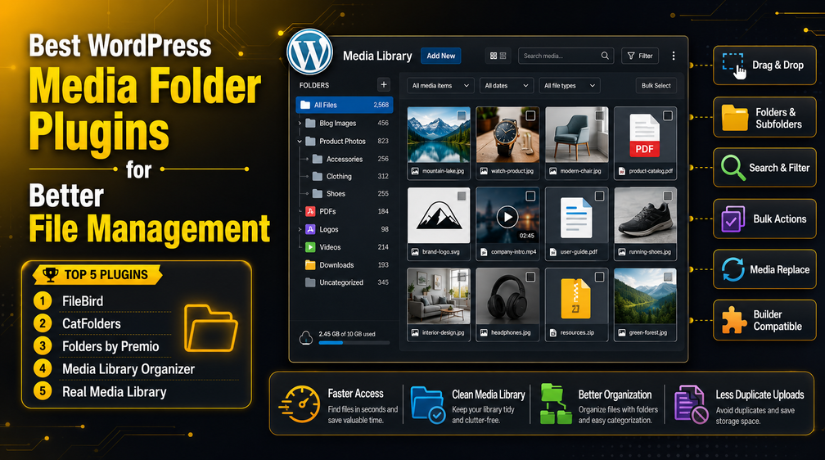
Best WordPress Media Folder Plugins for Better File Management
Introduction
A WordPress website needs many images, videos, PDFs, and documents. These files help make pages look useful and professional. But the default WordPress Media Library can become messy very fast. You may upload blog images, product photos, banners, logos, and forms. After some time, finding the right file becomes difficult and slow.
This problem becomes bigger on active websites with regular updates. You may upload the same image again by mistake. You may also forget where an old PDF was used. Poor file names can make the problem even worse. A file named IMG_2456.jpg gives no clear meaning. This makes daily website work confusing and time-consuming.
This is where a WordPress media library plugin becomes useful. It helps you manage files inside folders and groups. You can arrange files by page, product, topic, service, or campaign. A good Media folder plugin WordPress users can trust will make the Media Library cleaner and easier to use.
Many website owners now want to Organize WordPress media library files better. They need a simple system that saves time and reduces mistakes. The Best media library folder plugin for WordPress should offer folders, search, sorting, and simple controls. It should also work smoothly with your theme and page builder.
What Are WordPress Media Folder Plugins and Why They Matter
WordPress media folder plugins add folder-style organization to your Media Library. They help you arrange uploaded files in a simple structure. These plugins work like folders on your computer. You can create folders for blogs, products, services, downloads, or landing pages.
Most plugins use virtual folders inside the WordPress dashboard. This means your files are organized visually inside WordPress. The actual file URL usually stays the same. This is important because existing images should not break. Your old blog posts and pages can keep working normally.
A Media library organizer WordPress plugin gives better control over files. You can move images into folders using drag-and-drop tools. You can also search files faster and reduce repeated uploads. Some plugins include bulk actions, filters, galleries, and file replacement options.
These tools are not only for large websites. Small websites also benefit from better file control. A new website may look simple today. But it can collect hundreds of files within months. Starting with a clear folder system saves future cleanup work.
Many users also call these tools a WordPress file manager plugin. However, media folder plugins mainly focus on uploaded media files. They do not always manage full website files from the server. Their main goal is simple media organization inside WordPress.
Why You Need a Media Folder Plugin in WordPress
Media Folder Plugin Makes Your WordPress Media Library Easier to Manage
The WordPress Media Library becomes crowded as your website grows. You may upload images, PDFs, videos, icons, and banners daily. After some time, all files appear in one place. This makes file searching slow and confusing for users. A WordPress media library plugin helps solve this issue easily. It adds folders and groups inside your Media Library. You can organize files by blog, service, product, or campaign. This keeps your dashboard clean and simple to manage. A good Media folder plugin WordPress users can trust saves time. It helps you find old files without endless scrolling. This is very useful for active business websites.
Clean Media Library Saves Time During Regular Content Updates
Website updates become faster when media files are properly organized. Editors can find blog images without searching for several minutes. Designers can access logos, banners, and icons more easily. Store owners can manage product photos with better control. A WordPress media management plugin supports faster daily work. It reduces confusion during content changes and page updates. Teams can complete small updates without wasting extra time. This helps agencies, bloggers, and business owners work better. A clean media system also reduces mistakes during publishing. You can select the right image with more confidence.
Better File Organization Reduces Duplicate Uploads and Storage Waste
Many users upload the same file again by mistake. This usually happens when they cannot find old files. Duplicate images increase storage use and create more confusion. They also make the Media Library harder to manage. A Media library organizer WordPress plugin helps prevent this issue. It lets users find existing files before uploading again. You can create folders for repeated assets and common images. These may include logos, hero images, PDFs, and icons. When files are easy to find, duplicate uploads decrease. This keeps your website media area cleaner and lighter.
Media Folder Plugins Improve Team Workflow and Website Maintenance
Websites with multiple users need a clear file system. Writers, designers, developers, and managers may upload media files. Without folders, each person may store files differently. This can create confusion during updates and reviews. A WordPress file manager plugin helps teams follow one structure. Agencies can create folders for each client or project. Businesses can separate files by department, service, or campaign. WooCommerce teams can organize product images by category. This makes website maintenance easier for every team member. Clear folders help users work faster with fewer questions.
Better Media System Supports SEO and Content Management
Media organization also supports better content and SEO workflows. Clean file names help users understand each media file better. Organized folders make alt text updates easier to handle. You can review old images and update missing details. This helps improve your image SEO process over time. The Best WordPress media plugin should support clean file handling. It should help users manage media details with less effort. Some plugins also support metadata, captions, and file replacement. These options help content teams maintain better website quality. Better media control supports stronger long-term website management.
Features to Look for in WordPress Media Folder Plugins
Easy Drag-and-Drop Folder Management for Faster File Control
Drag-and-drop control is one of the most useful features. It lets users move files without technical steps. You can pick an image and place it inside folders. This makes the process simple for beginners and teams. The Best media library folder plugin for WordPress should include this feature. It should let users move one file or many files. This helps during cleanup, migration, and regular updates. A simple drag-and-drop system saves daily working time. It also makes the plugin easy for non-technical users.
Unlimited Folders and Subfolders for Large Website Media Libraries
Growing websites need more than one simple folder. They need folders, subfolders, and clear file sections. For example, you may create folders for service pages. Then you can create subfolders for each service type. This keeps your Organize WordPress media library process more structured. Unlimited folders help blogs, agencies, and WooCommerce stores. They also support websites with thousands of uploaded files. A plugin with limited folders may create future problems. Always choose a tool that supports your website growth. This helps avoid changing plugins again later.
Bulk File Actions to Save Time During Media Cleanup
Bulk actions are important for old and large websites. You may need to move many files at once. Moving each file separately can take too much time. Bulk controls help you select and move multiple files together. This feature is useful after redesigns and migrations. It also helps when cleaning unused or misplaced files. A strong WordPress media library plugin should support bulk management. It should make cleanup faster and easier for users. This feature helps teams finish media tasks with fewer clicks.
Search and Filter Options to Find Files Without Confusion
Search and filter tools help users find files quickly. You should search files by name, date, type, or folder. This is important when your website has many uploads. Filters reduce scrolling and make file selection faster. A good Media folder plugin WordPress users choose should include smart search. It should also support sorting by useful file details. These options help editors find the correct file quickly. They also reduce wrong image selection during page updates. Better search tools improve your full media workflow.
Media Replacement Feature for Updating Files Without Breaking Pages
Media replacement is very useful for changing old files. You can replace a PDF, image, or brochure easily. This avoids uploading a new file every time. It can also keep the same file link active. This is helpful for menus, forms, catalogs, and reports. A strong WordPress media management plugin may include this option. It helps users update files without changing many pages. This feature also reduces broken links and outdated downloads. It is very useful for business and service websites.
Page Builder Compatibility for Smooth Website Editing Workflows
Your media folder plugin should work with common website builders. It should support Gutenberg, Elementor, Divi, and WooCommerce. Many users insert images through page builder media windows. If the plugin fails there, your workflow becomes slow. A reliable Media library organizer WordPress plugin should work everywhere. It should show folders inside the normal media picker. This helps users select images during page design work. Good compatibility also reduces plugin conflicts and editing issues. Always test this before using it on live websites.
List O 5 Best WordPress Media Folder Plugins (Top Picks)
#1 FileBird
FileBird is a popular WordPress media library plugin for simple folder control. It helps you create virtual folders inside your Media Library. You can move files with drag-and-drop actions. It also supports smart sorting and faster media access. This makes it a strong choice for bloggers and small websites. Many users consider it a Best media library folder plugin for WordPress.
Features of FileBird
- It lets you create virtual folders for media files.
- It supports drag-and-drop file movement inside WordPress.
- It helps sort media files for faster access.
- It works smoothly with Gutenberg media selection.
- It helps identify unused files inside the Media Library.
Pros of FileBird
- It has a clean and beginner-friendly dashboard.
- It makes media file searching much faster.
- It helps users reduce repeated file uploads.
- It works well for blogs and business websites.
- It supports simple daily media management tasks.
Cons of FileBird
- Some useful features may need the paid version.
- It may not suit very complex enterprise websites.
- Advanced access control options may feel limited.
- Large teams may need stronger workflow features.
- Cloud storage support may not match advanced tools.
Download Link: FileBird
#2 CatFolders
CatFolders is a fast Media folder plugin WordPress users can use daily. It adds a folder tree inside the WordPress Media Library. You can create folders and move files with ease. The lite version supports unlimited main folders. It also helps users search and filter files quickly. This makes CatFolders useful for WooCommerce stores and content-heavy websites.
Features of CatFolders
- It adds a folder tree inside the Media Library.
- It supports unlimited main folders in the lite version.
- It allows simple drag-and-drop file movement.
- It helps users filter and search media files.
- It supports media organization in list and grid views.
Pros of CatFolders
- It feels fast and easy inside WordPress.
- It helps store owners manage product images better.
- It is useful for large image libraries.
- It supports quick folder-based file browsing.
- It has a clean workflow for beginners.
Cons of CatFolders
- Some advanced features may need the Pro version.
- It may not offer deep SEO metadata controls.
- Cloud features may be limited for bigger websites.
- Very large teams may need more permissions.
- Users should compare free and paid limits first.
Download Link: CatFolders
#3 Folders by Premio
Folders by Premio is more than a basic WordPress file manager plugin. It helps organize media files, pages, and posts together. This is useful for agencies and content-heavy websites. Users can create unlimited folders and move items by drag-and-drop. It also supports media replacement and folder import options. This makes it helpful for full WordPress admin organization.
Features of Folders by Premio
- It organizes media files, posts, and pages.
- It supports unlimited folders for better structure.
- It includes drag-and-drop movement for easier control.
- It offers media replacement for faster file updates.
- It supports folder import and export structure options.
Pros of Folders by Premio
- It helps organize more than media files.
- It is useful for agencies managing client websites.
- It gives bloggers better content folder control.
- It supports quick bulk media movement.
- It improves full WordPress dashboard organization.
Cons of Folders by Premio
- It may feel more than small websites need.
- Some advanced tools may require the Pro version.
- Media-specific SEO controls may be limited.
- Users need planning before creating many folders.
- Extra features may take time to understand.
Download Link: Folders by Premio
#4 Media Library Organizer
Media Library Organizer is a strong Media library organizer WordPress plugin. It helps users create unlimited folders and subfolders easily. It also supports drag-and-drop editing for better file placement. Users can export Media Library folders as ZIP files. It also supports default media attributes by file type. This makes it useful for SEO teams and content managers.


Features of Media Library Organizer
- It supports unlimited media folders and subfolders.
- It includes drag-and-drop folder editing.
- It allows ZIP export for Media Library folders.
- It supports default media attributes by file type.
- It helps organize WordPress media library content easily.
Pros of Media Library Organizer
- It supports structured media management for growing websites.
- It helps SEO teams manage image details better.
- It is useful for content-heavy WordPress websites.
- It supports folder export for better file control.
- It offers stronger organization than basic media tools.
Cons of Media Library Organizer
- It may need more setup time for beginners.
- Some users may find options slightly detailed.
- It may feel too advanced for small blogs.
- Teams should plan folders before using bulk actions.
- Users may need practice to use metadata settings.
Download Link: Media Library Organizer
#5 Real Media Library
Real Media Library is a powerful WordPress media management plugin for large websites. It helps organize thousands of images, videos, audio files, and PDFs. Users can create folders, collections, and galleries for better control. It works like a file manager inside WordPress. This makes it a strong choice for photographers, publishers, and image-heavy websites needing the Best WordPress media plugin.
Features of Real Media Library
- It organizes images, videos, audio files, and PDFs.
- It supports folders, collections, and galleries.
- It allows drag-and-drop file movement inside folders.
- It helps add folder-based galleries into posts.
- It works like a file manager inside WordPress.
Pros of Real Media Library
- It works well for large media libraries.
- It is useful for photographers and portfolio websites.
- It supports gallery-based image organization.
- It helps users find files much faster.
- It gives strong control over visual content.
Cons of Real Media Library
- It may feel advanced for first-time users.
- Some gallery features may need careful setup.
- Smaller websites may not need all options.
- Users should understand folders, collections, and galleries.
- Large websites still need regular media cleanup.
Download Link: Real Media Library
How to Choose the Right WordPress Media Folder Plugin For Your Website
Check Your Website Size Before Choosing a Media Plugin
Your website size should guide your plugin choice first. A small blog may need only simple folder control. A large business website may need advanced media tools. A WooCommerce store may need better product image organization. A portfolio website may need gallery-friendly media folders. So, never choose a plugin only by popularity. Choose one that matches your current website needs. The Best media library folder plugin for WordPress should make work easier. It should not add extra confusion to your dashboard. If your site has few files, use a simple plugin. If your site has thousands of files, choose stronger features. A good WordPress media library plugin should support your future growth.
Understand Your Main Media Management Use Case Clearly
Every website uses media files in a different way. A blog needs folders for article images and graphics. A store needs folders for product photos and banners. An agency needs folders for clients, campaigns, and projects. A photographer needs folders for albums, galleries, and events. So, your use case matters before plugin selection. A Media folder plugin WordPress users choose should match daily tasks. If you update pages often, choose fast folder access. If you upload many PDFs, choose media replacement support. If you manage SEO, choose metadata-friendly media tools. The right plugin should save time every working day.
Compare Free and Pro Features Before Installing Any Plugin
Many media folder plugins offer free and paid versions. The free version may work well for small websites. But advanced websites may need premium features later. Check folder limits before using any plugin seriously. Also check bulk actions, export tools, and replacement options. Some plugins allow unlimited folders only in paid plans. Others limit advanced search, role control, or cloud support. A WordPress media management plugin should fit your budget and needs. Do not install a plugin without checking feature limits. This helps you avoid plugin changes after setup. Changing media plugins later can take extra cleanup time.
Test Plugin Compatibility With Your Theme and Builder
Compatibility is very important for smooth website editing. Your plugin should work with your active WordPress theme. It should also work with Gutenberg, Elementor, or Divi. WooCommerce users should test product image media screens too. Some builders open the default WordPress media picker. Your folder plugin should appear correctly inside that screen. If not, your editing workflow may become slower. A good WordPress file manager plugin should not break editing tools. It should work smoothly during page and product updates. Always test the plugin on staging before full use. This keeps your live website safer during changes.
Choose a Plugin That Feels Easy for Daily Use
A plugin can have many features and still feel difficult. You need a tool your team can use daily. Editors should find images without asking for help. Designers should move files without extra training. Store owners should manage product photos with simple steps. A clean dashboard is better than a crowded interface. The Best WordPress media plugin should feel simple and useful. It should reduce work, not create more steps. If a plugin feels confusing, your team may avoid it. Choose a plugin that supports your normal workflow clearly. Easy daily use is more important than unused features.
Check Support, Updates, and User Feedback Carefully
A media folder plugin should be updated regularly. WordPress changes often, so plugin support matters. Check when the plugin was last updated. Also check whether it supports your WordPress version. Good support helps when you face folder issues. User reviews can show real problems and strengths. Look for feedback about speed, bugs, and compatibility. A reliable Media library organizer WordPress plugin should have active development. It should also have clear support options for users. Avoid plugins with poor updates or many unresolved complaints. This helps protect your website from future issues.
Common Mistakes to Avoid With WordPress Media Folder Plugins
Installing Multiple Media Folder Plugins on One Website
Many users install several similar plugins together. This can create conflicts and dashboard confusion. Two plugins may handle folders in different ways. One plugin may use virtual folders for media files. Another may use different structures or custom settings. This can make your Media Library harder to manage. Use only one main WordPress media library plugin for folders. Test it properly before adding it to your workflow. If you switch plugins, check migration options first. A single strong plugin keeps your setup cleaner and safer.
Deleting Media Files Without Checking Where They Are Used
Deleting media files without checking can break your website. An image may be used inside posts or pages. It may also appear in sliders, widgets, or builders. Some files may be linked inside downloadable content. If you delete them, visitors may see broken images. Always take a full backup before media cleanup. Then check where each file is used carefully. A WordPress media management plugin helps organize files better. But it cannot always confirm every hidden file usage. Careful cleanup protects your content and design from damage.
Ignoring the Difference Between Virtual and Physical Folders
Many users do not understand virtual media folders clearly. Virtual folders organize files visually inside WordPress. They usually do not change the real upload path. This means image URLs normally remain safe and unchanged. Physical folder changes may move real files on the server. That can break image links if done without planning. Most users should choose virtual folder systems first. A Media folder plugin WordPress users trust should explain this clearly. Understanding this difference helps prevent broken media problems. It also makes plugin selection easier and safer.
Creating Folders Without Planning a Clear Structure
A folder plugin helps only when structure is clear. Random folders can create another messy media system. You should plan folder names before moving many files. Use clear names like Blog Images, Product Images, and PDFs. You can also create folders by page or campaign. Agencies may create folders by client or project name. WooCommerce stores may organize files by product category. This helps users Organize WordPress media library files properly. A simple structure is easier for teams to follow. Good planning saves many hours during future updates.
Forgetting Image SEO While Organizing Media Files
Folders help with organization, but SEO still needs attention. You should use clear file names before uploading images. Add useful alt text for important visual content. Write captions only when they help readers understand images. Compress large images before adding them to pages. A Best media library folder plugin for WordPress supports better workflow. But it does not replace image SEO basics. You still need proper names, size control, and metadata. Clean media folders make this process easier to manage. Better image habits support stronger content quality over time.
Choosing a Plugin Without Checking Long-Term Needs
Many users choose a plugin for today’s problem only. Later, their website grows and needs better controls. They may need bulk movement, exports, or role control. They may also need WooCommerce or page builder support. Switching plugins later may take time and planning. So, think about your long-term media needs first. The Best WordPress media plugin should support future growth. It should handle more files as your website expands. It should also stay simple for daily users. A smart choice today prevents future media management problems.
Conclusion
A clean Media Library makes WordPress easier to manage. It helps you find files faster during updates. It also reduces duplicate uploads and wrong image use. A good WordPress file manager plugin supports better daily workflow. It helps bloggers, agencies, stores, and business websites. You can organize images, PDFs, videos, and documents clearly. The right plugin should match your website size and needs. It should also support your theme, builder, and team workflow. Before choosing, compare features, support, limits, and ease of use. A strong Media library organizer WordPress plugin can save many hours. It can also make website maintenance cleaner and more professional.
If your WordPress Media Library feels messy, now is the right time. Start with a clear folder plan and simple structure. Then choose a plugin that supports your daily work. Do not install many similar plugins together. Do not delete files without proper checks and backups. Keep image names, alt text, and file sizes clean. These small steps can improve your full media workflow.
Managing a large WordPress Media Library can take time. You may need help with cleanup, plugin setup, and broken media fixes. The team at 24×7 WP Support can help you manage this properly. They can assist with media organization, image optimization, plugin setup, and website maintenance. They can also help fix broken images and file management issues. Visit 24x7wpsupport for expert WordPress support and maintenance help.




Brian is a WordPress support specialist and content contributor at 24×7 WP Support. He writes practical, easy-to-follow guides on WordPress troubleshooting, WooCommerce issues, plugin and theme errors, website security, migrations, performance optimization, and integrations. With a focus on solving real website problems, Brian helps business owners, bloggers, and online store managers keep their WordPress sites running smoothly.
