
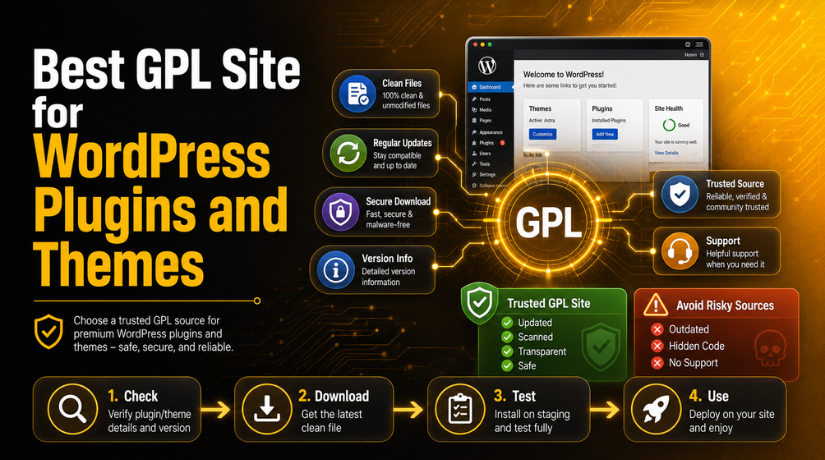
Best GPL Site for WordPress Plugins and Themes
Introduction
Many WordPress users search for affordable plugins and themes online. Premium WordPress tools can be costly for new website owners. Bloggers, small businesses, and freelancers often need budget-friendly options. This is where GPL-based WordPress resources become popular among users.
Many users search for the best GPL site for WordPress because they want useful tools without high yearly costs. They may need page builders, SEO plugins, security tools, backup plugins, or premium themes. GPL websites can help users access these tools for testing, learning, or building websites.
However, price should not be the only deciding factor. A cheap download can become expensive if it harms your website. Unsafe files may slow down your site or create security issues. Some files may also contain hidden code or outdated scripts.
A good GPL source should offer clean and updated files. It should also explain its terms clearly. Users should know what they are downloading and how it works. This helps them make better decisions before installing anything.
Before choosing any GPL website, users should focus on these points:
- The website should look professional and secure.
- Product details should show version and update dates.
- Files should be clean, tested, and easy to download.
- The website should offer clear support information.
- Users should test files before using them live.
Choosing the right GPL source can save time and reduce risk. It can also protect your website from future problems.
What Does GPL Mean in WordPress?
GPL stands for General Public License. It is a software license that gives users more freedom. WordPress itself is released under the GPL license. This means users can use, study, change, and share it.
Many GPL WordPress themes and plugins follow the same license model. This allows users to access and reuse the software code. It also supports the open-source nature of WordPress development.
GPL does not mean every download source is safe. This is a very important point for users. A plugin can be GPL licensed but still unsafe. The problem usually comes from the download website, not the license.
For example, a GPL plugin file may be changed by someone. It may include spam links, hidden scripts, or harmful code. It may also be an old version with security issues. That is why users should check the source before downloading.
GPL gives users legal software freedom. But safety depends on the website providing the files. A trusted GPL website should keep files clean and updated. It should not hide important details from users.
So, users should understand both sides clearly. GPL can be useful for WordPress users. But safe downloading needs care, testing, and trusted sources.
Why Choosing the Right GPL Website Matters
Choosing the right GPL website is very important for WordPress users. A plugin or theme can affect your whole website. It can change speed, security, layout, and user experience. That is why users must not download files carelessly.
A safe GPL plugin website for WordPress should provide clean files. It should not add hidden code, spam links, or unsafe scripts. Poor sources may offer changed files without clear information. These files can create serious problems after installation.
Unsafe GPL files may cause many website issues. They can break page layouts or stop features from working. They may also create plugin conflicts inside WordPress. In some cases, they can open security gaps for hackers.
Outdated GPL files are also a major concern. WordPress core, themes, and plugins change often. An old plugin may not work with the latest version. It may also miss important security fixes from developers.
Website owners should think beyond the download price. A cheap file can create costly repair work later. It can affect SEO, customer trust, and website performance. Business websites need stable and secure tools to grow.
Before using any GPL source, check its trust level carefully. Look for update details, file information, and support options. A good source should help users feel informed and safe.
Key Features of a Trusted GPL WordPress Plugin Site
A trusted GPL WordPress plugin site should be clear, safe, and professional. It should help users download files with better confidence. The website should also explain what users receive after purchase.
Clean and Unmodified Files
The website should provide clean plugin and theme files. These files should not include hidden scripts or spam links. Clean files reduce security risks and technical problems.
Regular Plugin and Theme Updates
Regular updates are a strong trust signal. A reliable GPL website should update files when new versions release. Updated files work better with modern WordPress versions.
Clear Product Version Details
Each product page should show useful file details. Users should see the plugin version, update date, and developer name. This helps users know if the file is current.
Secure Website and Checkout
The GPL website should use HTTPS for safe browsing. Its checkout process should also look secure and simple. A secure website protects user data during transactions.
Transparent GPL Terms
Clear terms help users understand download rights and limits. The website should explain GPL usage, support rules, and refund terms. This builds trust before users make a purchase.
Support or Contact Details
A reliable website should offer clear contact options. Users may need help with downloads or account access. Good support makes the website more dependable.
Positive Trust Signals
Good reviews, clear policies, and active updates matter. These signals show that real users trust the website. They also help new users make safer decisions.
How to Find the Best GPL Site for WordPress Plugins
Finding the right GPL source needs careful checking and planning. Many websites offer GPL downloads, but all are not equal. Some websites focus on safety, updates, and clear information. Others only focus on cheap downloads without proper quality checks.


Before choosing the best website to download GPL plugins, review important trust factors. A good GPL website should look professional and easy to use. It should also provide clear details about every plugin and theme.
Check Company Details First
Start by checking the website’s company information and contact page. A real business should share basic details with users. This includes email support, help pages, and clear policies. Avoid websites that hide their identity completely.
Review Update Frequency
Plugin updates are very important for WordPress website safety. Check whether the website updates popular plugins regularly. Updated files work better with newer WordPress versions. They also reduce errors, bugs, and security risks.
Read User Reviews Carefully
User reviews can show real service quality and trust level. Read both positive and negative feedback before buying access. Reviews can help you understand download speed and support quality.
Check File Safety Claims
A reliable GPL website should explain its file safety process. It should mention clean files, original sources, or scanning methods. These details help users make safer download decisions.
Avoid Unrealistic Offers
Be careful with websites offering everything for extremely low prices. Very cheap offers may look attractive at first. But they may include outdated, changed, or unsafe files. Always choose safety over a low-cost download.
Test Files on Staging First
Never install unknown files directly on a live website. Use a staging site before adding any GPL plugin. This protects your main site from errors or crashes.
GPL Plugins vs Official Premium Plugins: What Users Should Know
GPL plugins and official premium plugins are not always the same. GPL downloads may give users access to plugin files. But official purchases usually include extra services and direct support.
A best GPL WordPress plugins site may provide clean download files. However, it may not provide official developer support. Users may also miss automatic updates from the original developer. This matters for business websites with important features.
Official premium plugins often include license keys and account access. These license keys may unlock updates, templates, add-ons, and cloud features. Some plugins also need a valid license for API tools. Without that license, some features may not fully work.
GPL plugins can still help with testing and learning. They may also help users compare features before buying officially. But users must understand the limits before installation.
Use GPL files carefully and test them first. For serious business websites, official licenses may offer better peace. They also provide support when technical problems appear.
Safety Checklist Before Installing GPL WordPress Plugins or Themes
Installing GPL files needs care, testing, and proper website safety. A small mistake can affect your complete WordPress website. So, always follow a safety process before using any file.
Start with a full website backup before installing anything new. This gives you a safe restore point during problems. If the plugin breaks your site, you can recover quickly.
Next, test the file on a staging website first. A staging site is a private test copy. It helps you check errors without affecting visitors. This is very useful for business websites.
You should also scan the ZIP file before upload. Use a trusted malware scanner or security plugin. This helps find harmful scripts or changed files early.
Follow these basic safety steps before installation:
- Take a full backup of your WordPress website.
- Test GPL files on a staging website first.
- Scan plugin or theme files before uploading them.
- Check compatibility with your WordPress version.
- Avoid installing many GPL plugins together.
- Remove unused plugins and inactive themes.
- Monitor website speed after installation.
- Check admin users after installing new files.
These steps help reduce security and performance risks. They also protect your SEO, user trust, and website data.
When Should You Avoid a GPL Plugin or Theme Website?
You should avoid any GPL website that looks unclear or risky. A professional website should share basic trust details with users. If those details are missing, you should be careful.
Avoid a GPL source when it has no contact details. Also avoid websites without clear product update dates. Old files can create errors and security problems.
You should also avoid websites with no GPL policy. A clear policy helps users understand file rights and limits. Support details should also be visible before purchase.
Watch for these warning signs:
- No company details or contact page.
- No recent update date on product pages.
- No clear GPL usage policy.
- No support or refund information.
- Too many popups or suspicious ads.
- No HTTPS security on the website.
- Very old plugin or theme versions.
A risky source can cost more than an official license. It may lead to malware, downtime, and repair costs.
Conclusion
The best GPL source is not only the cheapest one. It should be safe, trusted, updated, and transparent. Website owners should always choose clean files and clear terms.
GPL downloads can be helpful for testing and learning. But users must check the source before using files. If you are unsure about any GPL plugin or theme, contact 24×7 WP Support. Our team can help with safe installation, plugin checks, malware cleanup, and WordPress support.



Brian is a WordPress support specialist and content contributor at 24×7 WP Support. He writes practical, easy-to-follow guides on WordPress troubleshooting, WooCommerce issues, plugin and theme errors, website security, migrations, performance optimization, and integrations. With a focus on solving real website problems, Brian helps business owners, bloggers, and online store managers keep their WordPress sites running smoothly.
