
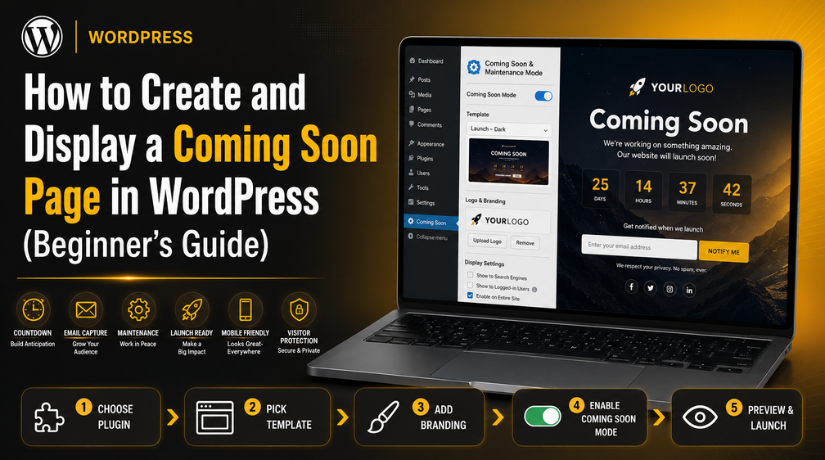
How to Create and Display a Coming Soon Page in WordPress (Beginner’s Guide)
Introduction
Coming Soon Page in WordPress helps protect your website before launch. It shows visitors a clean message while work continues behind the scenes. This page is useful when your design, pages, content, or settings are not ready. Instead of showing broken layouts, you show a professional launch message.
This builds trust before your website goes fully live. Many website owners use WordPress Coming Soon Mode during new website setup. It helps them work safely without affecting visitor experience. A coming soon page can also collect emails before launch. You can add a signup form and grow early interest. This helps you connect with visitors before opening the website.
If you want to Create Coming Soon Page WordPress users can view easily, the plugin method is often best. It is simple, fast, and does not need coding skills. This guide explains the first important part of the process. You will understand what it means and when to use it.
What Is a Coming Soon Page in WordPress and Why Is It Useful?
A Coming Soon Page in WordPress is a temporary website page. It appears before your full website is ready for visitors. This page tells users that something new is coming soon. It usually includes your logo, short message, and contact details. Some pages also include a countdown timer or signup form. A good coming soon page keeps your website professional. It also stops visitors from seeing unfinished pages and errors.
Many businesses use it before launching a new website. Some use it before launching a product, service, or online store. The main goal is to keep users informed. It also helps your brand stay visible during website development. If you are learning How to Add a Coming Soon Page in WordPress, start with a clear purpose. Your page should explain what visitors can expect soon. It should also give them one simple action to take.
When Should You Use a Coming Soon Page Before Website Launch?
You should use a coming soon page before launching a new website. This is helpful when your homepage is still incomplete. It is also useful when your service pages need final edits. Many website owners design pages while the domain is already active. Without a coming soon page, visitors may see unfinished content. This can create confusion and reduce trust in your brand. A coming soon page gives you time to work properly. You can test pages, menus, forms, and website settings. You can also review mobile design before launch. This helps you avoid mistakes when the website opens.
Use a Coming Soon Page During a WordPress Website Redesign
A coming soon page is also useful during website redesign work. Sometimes, an existing website needs a full design update. During this time, layouts may change across many pages. Images, sections, and menus may not look correct yet. Visitors should not see these design changes half completed. A coming soon page gives them a clean temporary experience. It tells users that improvements are being made. This helps protect your business image during the redesign. You can also use WordPress Maintenance Mode for active websites. This is better when your website is already getting traffic.
Use a WordPress Launch Page Before a New Product or Service
A WordPress Launch Page works well before product launches. It helps you promote your new product before release. You can add a short teaser about what is coming. You can also include a launch date or countdown timer. This creates interest and encourages visitors to return later. Businesses can collect emails using a simple signup form. This helps them notify users when the product goes live. Service businesses can use the same method before new offers. For example, you may launch a new booking service soon. You can show the basic details without revealing everything early.
Use an Under Construction Page WordPress Setup During Migration
An Under Construction Page WordPress setup is useful during migration. Website migration means moving a site to another host or server. During this process, some pages may load slowly or break. Images, forms, or links may also need testing. A temporary page helps reduce confusion during this time. Visitors see a stable page instead of technical problems. This is very useful during domain or hosting changes. It also helps when developers are testing the live setup. You can keep users informed with a simple message. Add contact details if the business must stay reachable. This helps customers contact you during the migration period.
Use a Coming Soon Page Before Opening an Online Store
Online stores should use coming soon pages before launch. Store owners need time to test products and payments. They must also check shipping, taxes, coupons, and checkout settings. If users place orders before testing, problems may happen. A coming soon page helps avoid failed orders and confusion. It also allows you to announce your store opening date. You can collect emails from interested buyers before launch. This is useful for discounts, launch offers, and product updates. A clean coming soon page can build buyer interest early. It also gives your store a more professional first impression. Before opening the store, test the full buying process carefully.
Important Checklist Before Creating and Displaying a Coming Soon Page
Before you create a Coming Soon Page in WordPress, prepare the main details first. A coming soon page should look simple, clear, and useful. It should not only say that your site is coming soon. It should also guide visitors with one clear next step. You may want users to join your list, contact you, or wait for launch updates. A proper checklist helps you avoid design, SEO, and setup mistakes. It also helps you display the page correctly for visitors. This is important before turning on WordPress Coming Soon Mode.
Decide the Main Goal Before You Create Coming Soon Page WordPress Setup
The first step is to decide your page goal clearly. Every coming soon page should have one main purpose. You may want to collect emails before your launch. You may want to share a launch date with visitors. You may also want users to contact your business directly. Your goal will guide the full page design. If your goal is lead collection, add a signup form. If your goal is support, add contact details clearly. If your goal is launch news, add a countdown timer. This makes your WordPress Launch Page more useful and focused. Avoid adding too many actions on one temporary page. One clear goal helps visitors understand what to do.
Prepare Your Logo, Brand Colors, and Basic Design Style
Your coming soon page should match your brand identity. Add your business logo at the top or center. Use your main brand colors across the page. Keep fonts simple, readable, and clean on every device. This helps visitors remember your brand before launch. A branded page also looks more trusted and professional. Avoid using random colors that do not match your website. Also avoid using too many font styles together. The design should feel clean, modern, and easy. If you plan to Create Coming Soon Page WordPress users trust, branding matters. Your page is often the first thing visitors see. So, make that first view strong and clear.
Write a Clear and Short Coming Soon Message
Your coming soon message should be short and direct. Visitors should understand the page within a few seconds. Use simple words that explain what is happening. You can write something like, “Our new website is launching soon.” You can also add one line about your business. Do not add long paragraphs on this temporary page. Too much content can make visitors leave quickly. Keep your headline strong and your message helpful. A clean message works well for any Under Construction Page WordPress setup. It tells users that work is still in progress. It also gives them confidence that the website will launch soon. Use friendly words, but avoid unclear marketing lines.
Add Contact Details So Visitors Can Reach You Easily
A coming soon page should still help visitors contact you. Add a business email, phone number, or contact button. This is important if your business already serves customers. Some visitors may need help before your website launches. Others may have questions about your services or products. Clear contact details reduce confusion and missed business chances. Place contact details where users can easily see them. You can add them near the form or footer area. Make sure email links and phone links work correctly. This is also useful during WordPress Maintenance Mode. Visitors can still reach you while updates are running. A visible contact option builds trust before launch.
Add an Email Signup Form to Collect Early Leads
An email signup form can make your coming soon page stronger. It helps you collect leads before your website goes live. Visitors can join your list for updates or offers. You can later send launch news directly to them. This is useful for service websites, stores, and product launches. Keep the signup form short and easy to complete. Ask only for the details you really need. Usually, name and email are enough for early updates. Long forms can reduce signups and hurt user experience. If you are learning How to Add Coming Soon Page in WordPress, include form testing. Submit a test entry before making the page live. This helps confirm that emails are captured correctly.
Add Active Social Media Links for Better Brand Connection
Social media links help visitors stay connected before launch. Add only active profiles that your business uses regularly. You can add Facebook, Instagram, LinkedIn, YouTube, or X links. Do not add social links that are empty or inactive. Inactive links can reduce trust and look careless. Place social icons in a clean and visible area. Many coming soon plugins include social icon options. These links support your WordPress Launch Page before the full site opens. Visitors can follow updates without visiting the website again. This keeps your brand active during the development stage. Always test each social link after adding it. Broken links can make the page look unprofessional.
How to Create and Display a Coming Soon Page in WordPress (Step By Step)
Creating a Coming Soon Page in WordPress is simple with a plugin. This method works well for beginners and business owners. You do not need coding skills. A plugin gives you templates, design options, and display controls. You can create the page and enable WordPress Coming Soon Mode quickly. Visitors will see your coming soon message. Logged-in admins can still work on the real website.
Step 1: Choose a Reliable Coming Soon Plugin
- Go to your WordPress dashboard.
- Open Plugins > Add New.
- Search for a coming soon plugin.
- Check the plugin rating and reviews.
- Review the active installation count.
- Check when the plugin was last updated.
- Choose a plugin with mobile-friendly templates.
- Make sure it supports forms and SEO settings.
- Check if it offers WordPress Maintenance Mode too.
- Avoid outdated plugins with poor support.
Step 2: Install the Plugin from Your WordPress Dashboard
- Go to WordPress Dashboard > Plugins > Add New.
- Type the selected plugin name in the search box.
- Click the Install Now button.
- Wait for WordPress to complete the installation.
- Click the Activate button after installation.
- Check the dashboard for the plugin menu.
- Open the plugin settings area.
- Review the setup options before making changes.
- Keep the plugin updated after activation.
- This helps keep your website safe and stable.
Step 3: Open the Plugin Settings and Select Coming Soon Mode
- Open the plugin settings from your dashboard.
- Look for the coming soon mode option.
- Select WordPress Coming Soon Mode for new websites.
- Use WordPress Maintenance Mode for existing website updates.
- Check if admins can access the real website.
- Keep dashboard access enabled for logged-in users.
- Review visitor display settings carefully.
- Check if search engine settings are available.
- Save the settings after reviewing all options.
- Test the setup before showing it publicly.
Step 4: Select a Clean Coming Soon Page Template


- Open the template section inside the plugin.
- Choose a clean and simple design.
- Avoid templates with too many sections.
- Select a layout that matches your brand.
- Choose a template with clear text spacing.
- Use a design that supports one main action.
- Add a form-based template for lead collection.
- Add a contact-focused template for service websites.
- Avoid heavy animations or large media files.
- A simple Under Construction Page WordPress layout works best.
Step 5: Add Your Logo and Brand Colors
- Upload your business logo.
- Place the logo where visitors can see it clearly.
- Use your main brand colors.
- Keep button colors clear and readable.
- Use simple fonts that match your website style.
- Avoid using too many colors together.
- Keep the design clean and professional.
- Check that text is visible on the background.
- Make the page match your business identity.
- A branded page builds trust before launch.
Step 6: Write a Clear Heading and Short Message
- Add a clear main heading.
- Use a heading like Our New Website Is Coming Soon.
- Keep the heading short and direct.
- Add one short message below the heading.
- Tell visitors that your website is being prepared.
- Mention that updates will be shared soon.
- Avoid long paragraphs on the page.
- Use simple words that users understand quickly.
- Keep the message friendly and professional.
- This makes your WordPress Launch Page more effective.
Step 7: Add an Email Signup Form
- Add an email signup form to the page.
- Keep the form short and simple.
- Ask only for important details.
- Use name and email fields if needed.
- Avoid long forms with many fields.
- Connect the form with your email tool.
- Check if the plugin supports email integration.
- Submit a test entry before publishing.
- Confirm that form entries are received correctly.
- This helps collect early leads before launch.
Step 8: Add Contact Details and Social Media Links
- Add your business email address.
- Add your phone number if needed.
- Add a contact button for quick action.
- Include only active social media links.
- Add Facebook, Instagram, LinkedIn, or YouTube.
- Avoid inactive or empty social profiles.
- Test every contact link carefully.
- Make sure phone links work on mobile.
- Make sure email links open correctly.
- These details help visitors reach you before launch.
Step 9: Configure the Page Display Settings
- Open the display settings inside the plugin.
- Enable WordPress Coming Soon Mode.
- Show the page to logged-out visitors.
- Allow logged-in admins to view the real website.
- Give access to selected user roles if needed.
- Exclude login or preview pages if required.
- Check if important pages should remain accessible.
- Save the display settings carefully.
- Avoid settings that show unfinished pages publicly.
- Test the display before sharing your website link.
Step 10: Preview the Page Before Publishing
- Preview the page before making it live.
- Check the desktop view first.
- Check the tablet view after that.
- Check the mobile view carefully.
- Make sure the logo looks clear.
- Check heading size and text spacing.
- Make sure buttons are easy to tap.
- Check that the form fits mobile screens.
- Make sure images do not overlap text.
- Fix all layout issues before publishing.
Step 11: Publish the Page and Test as a Visitor
- Save your final page design.
- Turn on the coming soon display mode.
- Open the website in an incognito browser.
- Check the page as a normal visitor.
- Confirm that the coming soon page appears.
- Check the heading, message, logo, and form.
- Click all buttons and links.
- Submit the form one final time.
- Make sure unfinished pages are hidden.
- Fix any issue before sharing the website link.
Step 12: Disable the Coming Soon Page After Launch
- Open the plugin settings after launch.
- Turn off WordPress Coming Soon Mode.
- Check your live homepage.
- Test menus, buttons, forms, and links.
- Review search engine visibility settings.
- Remove noindex settings if they were enabled.
- Clear your WordPress website cache.
- Clear hosting or CDN cache if needed.
- Open the site in incognito mode again.
- Confirm that visitors see the full live website.
Common Mistakes to Avoid When Using a Coming Soon Page in WordPress
A Coming Soon Page in WordPress can help your website launch better. However, small setup mistakes can create serious problems. These mistakes can affect visitors, search engines, and website access. Many website owners enable the page but forget key checks. Some forget SEO settings, mobile design, or form testing. Others leave WordPress Coming Soon Mode active after launch. This can stop visitors from seeing the live website. So, you should review every important setting before and after launch.
Leaving WordPress Coming Soon Mode Active After Website Launch
One common mistake is leaving the coming soon mode active too long. This can hide your live website from normal visitors. You may think the website is live and ready. But visitors may still see the temporary page only. This can hurt traffic, leads, and customer trust. It can also create confusion after your launch date. Always turn off WordPress Coming Soon Mode after final testing. Then open your website in an incognito browser window. This helps you see the site like a real visitor.
Forgetting to Check Search Engine Visibility and SEO Settings
SEO settings are very important before publishing your website. Some coming soon plugins add noindex settings automatically. This can stop search engines from indexing your pages. That may be useful before the website is ready. But it can become a problem after launch. Many users forget to remove noindex after going live. This can affect rankings and organic visibility. Check your SEO plugin settings before disabling the page. Also review WordPress reading settings for search visibility.
Using Too Much Text on the Coming Soon Page
A coming soon page should be simple and focused. Some website owners add too much text and detail. This makes the page look crowded and hard to read. Visitors should understand your message within a few seconds. Use one strong heading and one short message. Add one clear action, such as joining your list. Avoid adding long service details or full website content. Your full website can explain those details after launch. A short message works better for most temporary pages.
Not Adding Contact Details for Interested Visitors
Many website owners forget to add contact details. This can cause missed leads before the website launches. Visitors may want to ask questions about your business. They may also need service details, support, or pricing help. If no contact option exists, they may leave quickly. Add your email, phone number, or simple contact button. Keep the contact option easy to find and use. You can also add active social media profiles. This helps users stay connected before launch. Contact details are also useful during WordPress Maintenance Mode. They help visitors reach you while the website is unavailable.
Ignoring Mobile Design Before Displaying the Page
Mobile design is very important for every WordPress website. Many visitors may open your website from mobile devices. If the page looks broken, they may lose trust. Always check your coming soon page on phones first. Review the heading, message, form, button, and logo. Make sure all items fit the mobile screen. The button should be easy to tap with fingers. The form should be simple and quick to submit. Images should not cover text or important buttons. A mobile-friendly Coming Soon Page in WordPress creates a better first impression.
Using Heavy Images, Videos, or Effects on the Page
A coming soon page should load fast for visitors. Large images and videos can slow it down quickly. Heavy effects can also create poor mobile performance. Slow pages can make visitors leave before reading anything. Use optimized images that look clear but load fast. Avoid background videos unless they are truly needed. Keep animations simple and light across the page. A fast WordPress Launch Page gives users a better experience. It also shows that your website is being built carefully.
Not Testing the Page as a Logged-Out Visitor
Website admins often see a different page while logged in. This can make testing confusing during setup. You may see the real website from your admin account. But visitors may see the coming soon page only. Always test your page as a logged-out visitor. Use incognito mode or another browser for testing. Check that the right temporary page appears publicly. Also confirm that admins can still access the dashboard. This is important when using WordPress Coming Soon Mode.
Not Testing the Email Signup Form Before Publishing
An email signup form can collect valuable early leads. But a broken form can waste good traffic. Many website owners add a form but never test it. This can cause missed emails and lost launch updates. Always submit a test entry before publishing the page. Check if the email reaches the correct inbox. Also check if the user receives any confirmation message. If you use an email marketing tool, test that connection too. Keep the form short and easy for visitors.
Conclusion
A Coming Soon Page in WordPress helps protect your website before launch. It hides unfinished pages and shows a professional message. It also helps visitors understand that something new is coming. You can use it before a new website, redesign, migration, or store launch. A plugin makes the process simple for most users. It helps you design, publish, and manage the page easily. You should also check mobile design, SEO settings, and forms. These checks help avoid common launch problems. Always disable the page when your website is ready. Then test the live website as a normal visitor. A well-planned coming soon page builds trust before launch.
If you need expert help, 24x7wpsupport can assist you. Our team can create, design, and display your coming soon page correctly. We can also check your forms, mobile layout, SEO settings, and launch setup. This helps your website look professional before it goes live. We can also support your full WordPress launch process from start to finish. Visit 24x7wpsupport today for expert WordPress help.
Related posts:
How to fix WordPress Malware Virus error in websites

How to Set Up Business Voicemail Greetings with Examples
How to Create a Q&A Feature in WordPress: Step By Step Guide
How to Set Up Google Tag Manager in WordPress Without a Plugin (Complete Guide)
How to Use Algolia in WordPress: Step-by-Step Guide for Beginners

Brian is a WordPress support specialist and content contributor at 24×7 WP Support. He writes practical, easy-to-follow guides on WordPress troubleshooting, WooCommerce issues, plugin and theme errors, website security, migrations, performance optimization, and integrations. With a focus on solving real website problems, Brian helps business owners, bloggers, and online store managers keep their WordPress sites running smoothly.
