
What Software Does Salesforce Integrate With? A Guide for WordPress Website Owners
Introduction
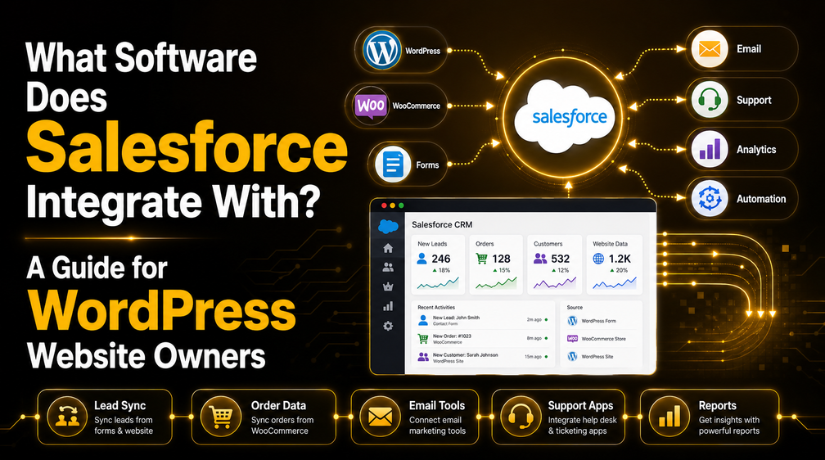
Many WordPress website owners ask one common question: what software does Salesforce integrate with? The answer is simple. Salesforce can connect with many tools that support sales, marketing, support, forms, eCommerce, and reporting. This makes it useful for businesses that want better control over website data.
A WordPress website can collect many types of information each day. This may include contact form entries, quote requests, product orders, booking details, and customer questions. When this data stays inside different tools, teams may miss important leads. They may also spend more time copying details by hand.
Salesforce helps bring this information into one central system. This allows sales and support teams to view customer details faster. It also helps businesses track leads from the first website visit to final sale.
For WordPress users, this connection can be very helpful. It can link forms, WooCommerce, email tools, support platforms, and automation systems. This gives website owners a clearer view of customer activity. It also helps teams respond with better timing and more useful details.
Why Salesforce Integrations Matter for WordPress Website Owners
Salesforce integrations matter because they reduce manual work and improve data flow. Many WordPress websites depend on forms, landing pages, online stores, and service pages. These pages collect useful customer information. But that information must reach the right team at the right time.
For example, a contact form can send a lead directly into Salesforce. A WooCommerce order can update customer purchase details. A support request can connect with an existing customer record. This helps teams avoid repeated questions and delayed replies.
These integrations can also support better marketing. Website owners can group leads based on interest, service type, or order history. Then, they can send more useful follow-up messages.
For small businesses, this saves time and improves accuracy. For growing businesses, it supports a better sales process. With the right setup, WordPress and Salesforce can work together as one connected system.
Common Types of Software That Work With Salesforce
There are many types of software that works with Salesforce. For WordPress website owners, the most useful tools are usually connected to leads, sales, orders, support, and marketing. These tools help move website data into Salesforce without extra manual effort.
A WordPress website may use several plugins and platforms every day. Each one may collect important customer details. Salesforce can help organize that data in one place. This makes it easier to follow leads, manage customers, and improve communication.
-
WordPress Form Plugins
WordPress form plugins are one of the most common integration needs. Most business websites use forms for contact requests, quotes, bookings, consultations, or newsletter signups. These forms often collect names, emails, phone numbers, and service interests.
When a form connects with Salesforce, each submission can become a lead. This helps sales teams respond faster and track every inquiry. It also reduces missed messages from busy inboxes or website dashboards.
-
WooCommerce and eCommerce Tools
WooCommerce stores collect useful customer and order information. This may include product details, payment status, shipping data, and purchase history. When WooCommerce connects with Salesforce, this data becomes easier to manage.
Store owners can view customer activity inside Salesforce. Sales and support teams can see what a customer bought. This helps them offer better service and smarter follow-ups. It can also support repeat sales and customer care.
-
Email Marketing Platforms
Email marketing platforms can also connect with Salesforce. These tools help businesses manage subscribers, campaigns, and customer lists. For WordPress website owners, this connection can improve lead nurturing.
For example, a website visitor may fill out a form. That lead can enter Salesforce and join an email list. Later, the business can send helpful emails based on interest. This creates a more focused marketing process.
-
Customer Support and Help Desk Software
Customer support software helps manage questions, complaints, and service requests. When it connects with Salesforce, support teams can see customer details quickly. They can review past orders, form entries, and earlier support history.
This gives customers a better support experience. Teams do not need to ask the same questions again. They can understand the issue faster and provide a clearer reply. For WordPress businesses, this helps build trust and long-term customer relationships.
Popular Apps and Platforms That Can Integrate With Salesforce
Many WordPress website owners use different apps to manage daily business tasks. These apps may handle leads, email, orders, support, accounting, or reports. Salesforce can connect with many of these tools to make data easier to manage.
The most useful apps that integrate with Salesforce depend on your website goals. A service business may need lead form integration. An online store may need WooCommerce order sync. A growing business may need automation between several platforms.
Common app categories include:
- WordPress connectors: These help send website form data into Salesforce.
- WooCommerce connectors: These sync customer and order details.
- Email marketing tools: These manage campaigns and subscriber lists.
- Help desk tools: These connect support tickets with customer records.
- Accounting tools: These help link sales and billing details.
- Communication tools: These support team alerts and customer updates.
- Analytics platforms: These help measure leads, sales, and campaigns.
- Automation tools: These move data between different business systems.
For WordPress owners, the best app should match the data flow. For example, a simple website may only need form submissions. A larger website may need product, order, and customer syncing. Some businesses may also need lead scoring or custom field mapping.
Before choosing any app, review its features carefully. Check whether it supports your WordPress forms, WooCommerce setup, and Salesforce fields. Also check update history, reviews, and support quality. A good integration should save time, not create more work.
Salesforce Integration Software for Automation and Data Sync
Salesforce integration software works like a bridge between Salesforce and other tools. It helps move data from one system to another. This can reduce manual entry and improve accuracy.


Some tools support one-way data sync. This means data moves from WordPress into Salesforce. For example, a contact form can create a new Salesforce lead. Other tools support two-way sync. This means changes can update in both systems.
These tools may also support custom field mapping. This helps match WordPress form fields with Salesforce fields. For example, “Service Needed” on your website can match a Salesforce lead field.
Automation is also useful for follow-ups. A new form submission can assign a sales team member. A WooCommerce order can update a customer profile. A support request can attach to the right contact record.
For WordPress website owners, this creates a cleaner process. Teams can view updated data faster. They can also act on leads, orders, and requests with less delay.
Salesforce Third-Party Integrations for WordPress and WooCommerce
Many WordPress website owners use plugins or connector tools to link Salesforce with their site. These tools help move data without building everything from scratch. Salesforce third party integrations can be useful when a business needs faster setup and easier data flow.
For a WordPress site, form integrations are very common. A contact form, quote form, or service request form can send details into Salesforce. This helps sales teams receive new leads quickly. It also keeps lead records more organized inside one system.
WooCommerce integrations are also helpful for online stores. They can sync customer details, orders, product data, and purchase history. This gives sales and support teams a clearer view of each customer. It also helps with better follow-ups after a purchase.
Some websites may need more than forms or orders. Membership websites may sync user details with Salesforce contacts. Booking websites may send appointment details into Salesforce. Learning websites may connect course signups with customer records.
Common third-party integration uses include:
- Sending WordPress form leads into Salesforce
- Syncing WooCommerce orders and customers
- Connecting membership users with Salesforce contacts
- Sending booking or appointment details
- Mapping custom fields to Salesforce fields
Before choosing a tool, website owners should review it carefully. Check its update history, support quality, security features, and plugin reviews. Also confirm that it supports your Salesforce fields and WordPress setup.
When WordPress Website Owners May Need Custom Salesforce Integration
Ready-made plugins are useful, but they may not fit every need. Some WordPress websites have advanced forms, custom fields, or custom post types. In these cases, a basic plugin may not map data correctly.
Custom Salesforce integration may be needed for complex WooCommerce stores. For example, a business may need to sync order status, product type, payment data, or customer notes. Custom API work can help manage this data more clearly.
A business may also need custom work when several systems share data. This can include WordPress, WooCommerce, email tools, support platforms, and Salesforce. A custom setup can create a smoother and safer workflow.
How to Choose the Right Salesforce Integration for Your WordPress Website
Choosing the right Salesforce integration starts with your website needs. Every WordPress site collects different data. Some sites collect leads only. Others manage orders, bookings, support requests, or memberships. So, the best setup depends on how your website works.
Start by checking what data needs to move. This may include names, emails, phone numbers, product orders, form details, or customer notes. Clear data planning helps avoid mistakes during setup.
Next, decide how the data should sync. Some websites only need one-way sync from WordPress to Salesforce. This works well for lead forms and quote requests. Other websites may need two-way sync. This is useful when updates must appear in both systems.
You should also review the tools already used on your site. Check whether the integration supports your form plugin, WooCommerce store, or custom fields. A good tool should fit your current WordPress setup. It should not force major changes without reason.
Before going live, review these important points:
- Check plugin updates and support history.
- Review security and user permission settings.
- Confirm custom field mapping options.
- Test form and order data carefully.
- Check whether custom API work is needed.
Testing is very important before using the integration live. A small test can show whether leads, orders, and customer details reach Salesforce correctly. It can also help find missing fields or duplicate records early.
Conclusion
Salesforce can integrate with many tools used by WordPress website owners. These include form plugins, WooCommerce, email marketing tools, help desk software, analytics platforms, automation tools, and custom systems. The right connection can improve data flow and reduce manual work.
Before choosing any tool, review your website setup and business goals. Also check what data your team needs inside Salesforce. This helps you choose a safer and more useful integration path.
If your WordPress website needs better Salesforce connectivity,24×7 WP Support can help you review your setup and understand the right integration path for your website.

Brian is a WordPress support specialist and content contributor at 24×7 WP Support. He writes practical, easy-to-follow guides on WordPress troubleshooting, WooCommerce issues, plugin and theme errors, website security, migrations, performance optimization, and integrations. With a focus on solving real website problems, Brian helps business owners, bloggers, and online store managers keep their WordPress sites running smoothly.
